All-in-one digital toolkit. Premium WordPress themes, Shopify themes, plugins, templates & creative assets.




 Recently Updated

#Overview
WP Fusion’s Abandoned Cart addon works with:
to automatically add customers to your CRM when they begin checking out on your store.
After the customer’s name and email have been entered on the checkout form, the customer is added as a contact to your CRM (even if they don’t complete the checkout).
You can then use automations in your CRM to follow up with customers who don’t complete checkout within a specified period of time.
The Abandoned Cart addon is available with Plus and Professional licenses.
#General settings
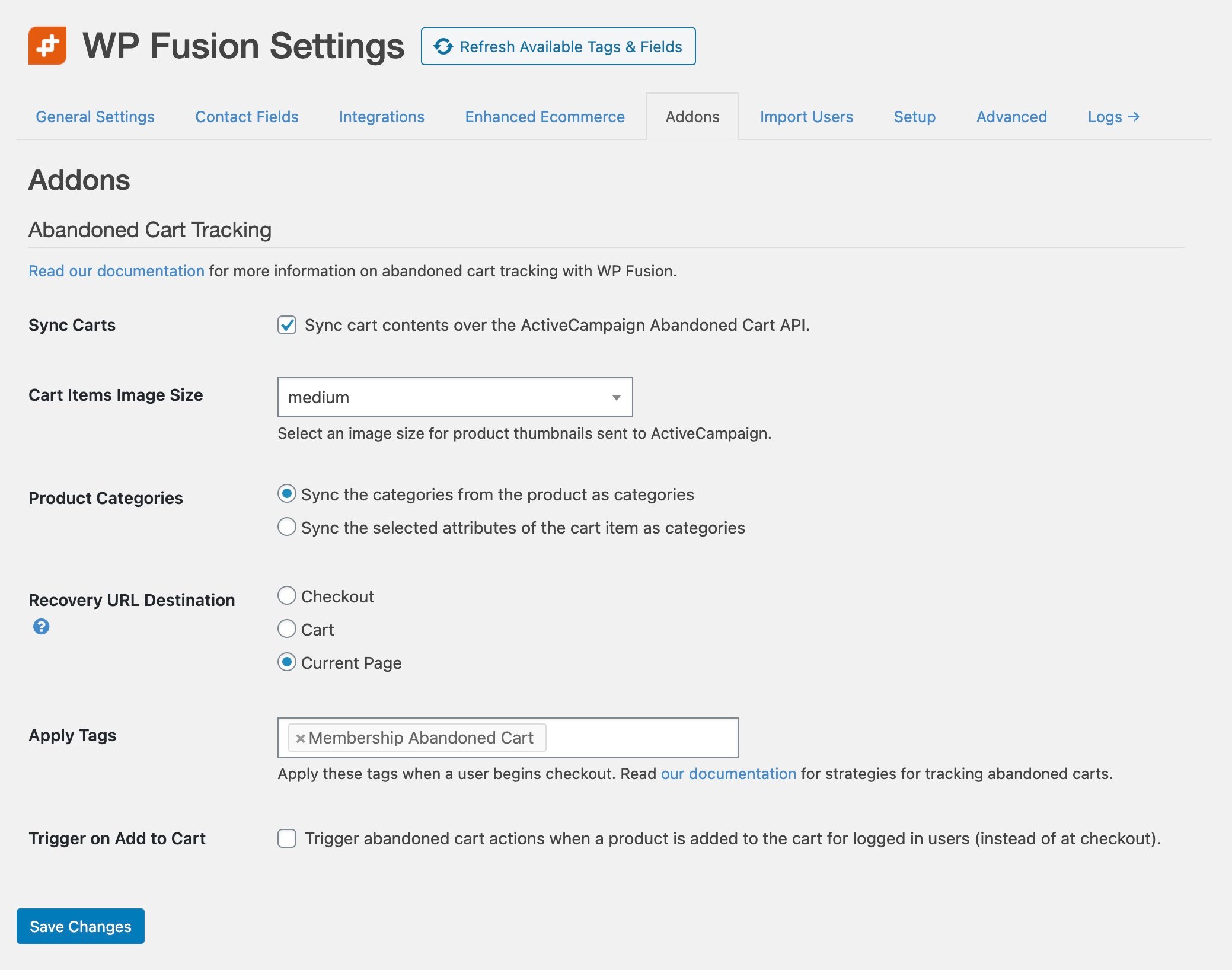
This addon has several general settings, which are found at Settings » WP Fusion » Addons » Abandoned Cart Tracking.
Depending on your connected CRM, different options will appear. The available settings are:
- Sync Carts: Both ActiveCampaign and Drip have the ability to sync entire cart contents over their APIs, including the cart products, prices, categories, product images, and applied discounts. If you’re connected to ActiveCampaign or Drip, you can enable this “enhanced” cart functionality by checking the box for Sync Carts. For more details see ActiveCampaign Abandoned Cart Guide and Drip Abandoned Cart Guide.
- Cart Items Image Size: This setting appears when Sync Carts is enabled and lets you specify the product cart image size that should be synced into your CRM. Larger images will display more clearly in cart recovery emails, but will make the emails slower to load.
- Product Categories: This setting appears when Sync Carts is enabled and lets you select how product categories should be treated in ActiveCampaign or Drip. When “categories” is selected the product categories will be synced, when “attributes” is selected, the selected product attributes will be synced (for example “Large”, “Blue”)
- Recovery URL Destination: When using recovery URLs (see below), you can select where the URL should take the returning customer. Current Page works best with plugins like CartFlows, WooFunnels, or LaunchFlows where different products have different checkout pages.
- Apply Tags: You can specify tags to be applied to the customer, which can trigger sequences in your CRM to follow up with customers who didn’t complete a purchase. Tags can also be configured for specific products while editing each product (see Plugin Integrations below).
- Trigger on Add to Cart: This lets you start the abandoned cart process for logged in users when they add a product to the cart (instead of at checkout).
#Syncing Cart Fields
With all CRMs, WP Fusion has the ability to sync details about the abandoned cart to custom fields on contact records in the CRM. These fields can then be added to cart recovery emails using merge tags.
To enable these fields, head to Settings » WP Fusion » Contact Fields » WP Fusion Abandoned Cart.
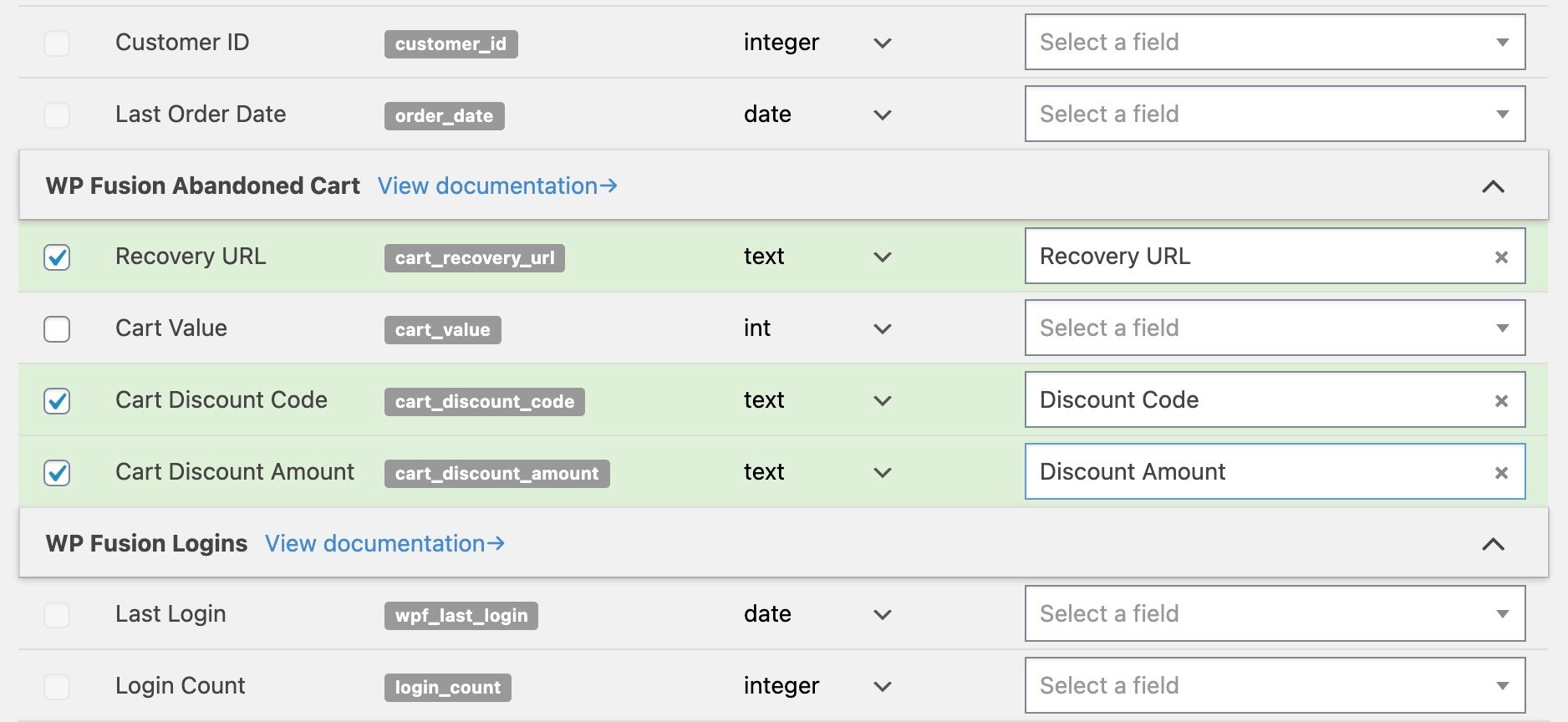
Any enabled fields will be synced to the corresponding custom fields in your CRM whenever a cart is updated (currently limited to WooCommerce and Easy Digital Downloads).
#Recovery URLs
With WooCommerce and Easy Digital Downloads, WP Fusion has the ability to generate a cart recovery URL and sync it to a custom field in your CRM.
This can be enabled by enabling the Recovery URL field for sync from the Contact Fields list (see above).
When a customer begins to check out (or their cart contents are updated), the cart contents will be saved into a cache in your database, and the recovery URL will be synced to the selected custom field in your CRM.
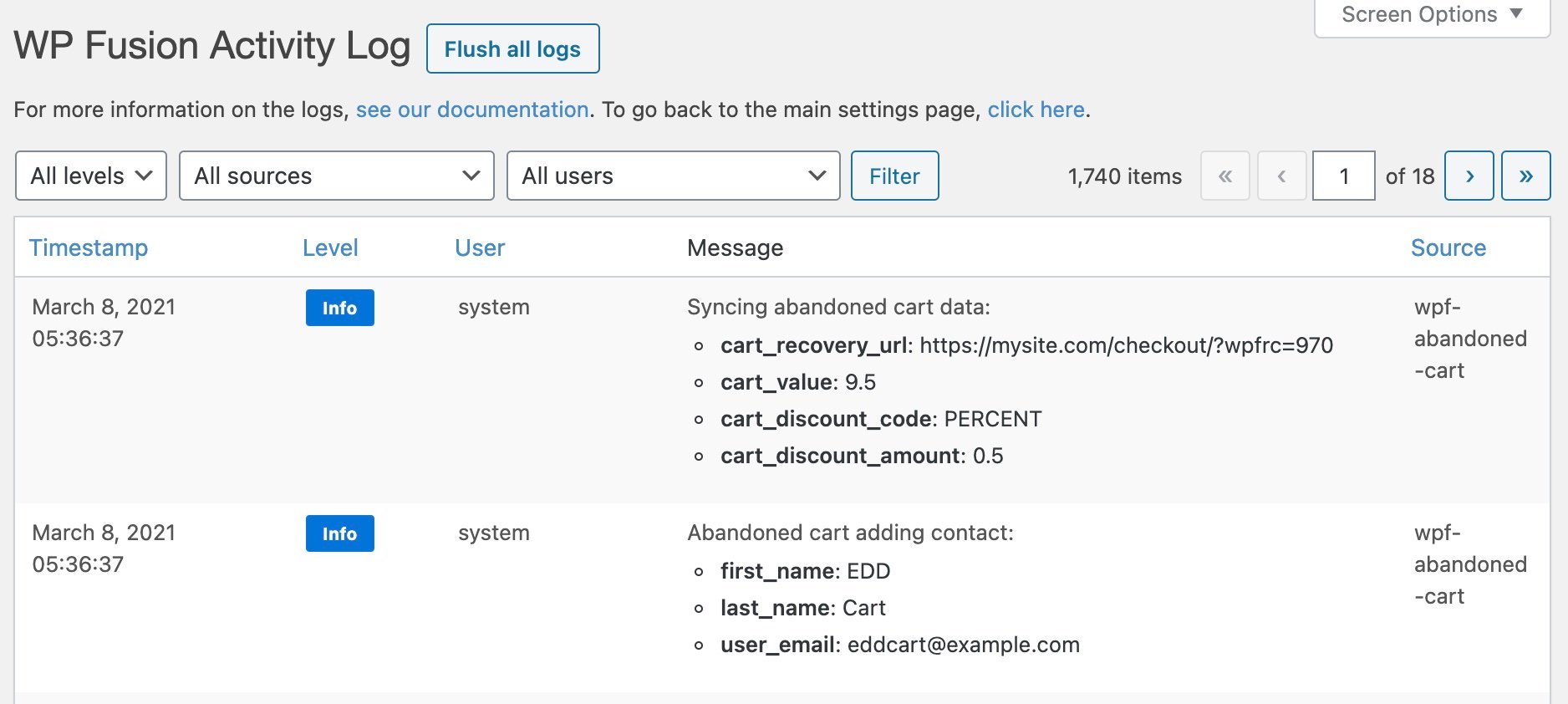
You can then use a merge field in the email editor in your CRM to include the unique recovery URL.
Heads up: If you are using a Recovery URL custom field in your CRM as the parameter for a button or link in an email, it’s recommended to turn off Google Analytics tracking on that link.
The reason is that the UTM parameters can get appended to the contact ID, which causes the cart recovery not to work.
When the recovery URL is visited the customer’s cart contents will be restored, and the checkout fields will be pre-filled using the information that was entered in the initial abandoned checkout session.
#Plugin integrations
WP Fusion’s abandoned cart addon can track abandoned carts in WooCommerce, Easy Digital Downloads, LifterLMS, and MemberPress.
In addition to the global settings, you can also track individual products by specifying tags to be applied in your CRM when a specific product is in an abandoned cart.
#WooCommerce
With WooCommerce you can specify product-specific abandoned cart tags from the WP Fusion panel while editing any product.
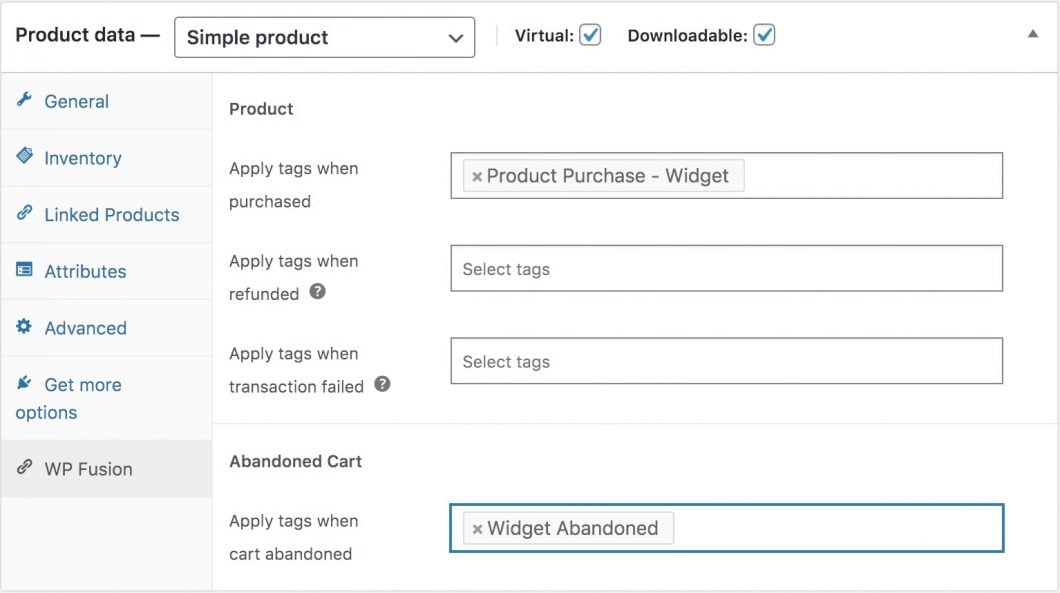
You can also specify variation-specific tags when editing any variation.
#Easy Digital Downloads
With Easy Digital Downloads cart abandonment tags can be set on the main WP Fusion meta box for each download.
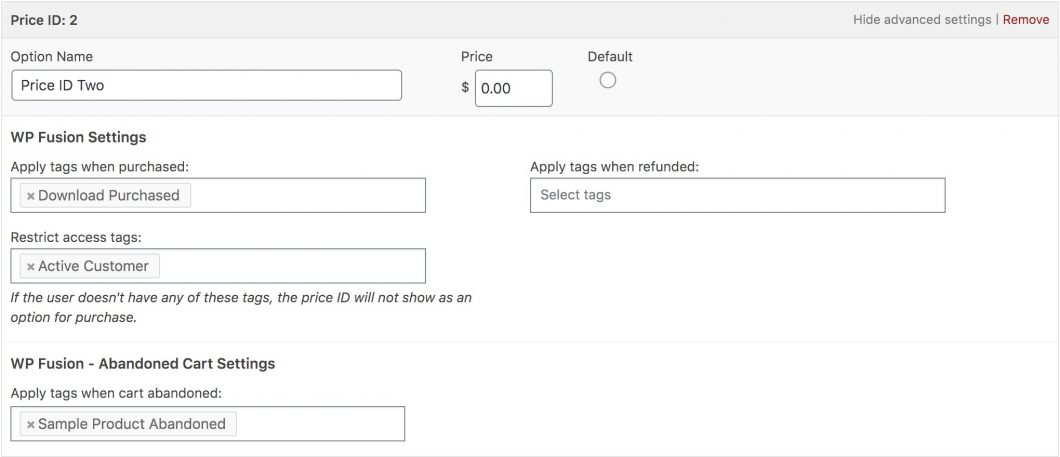
You can also specify cart abandonment tags for individual price IDs when editing a price ID.
#LifterLMS
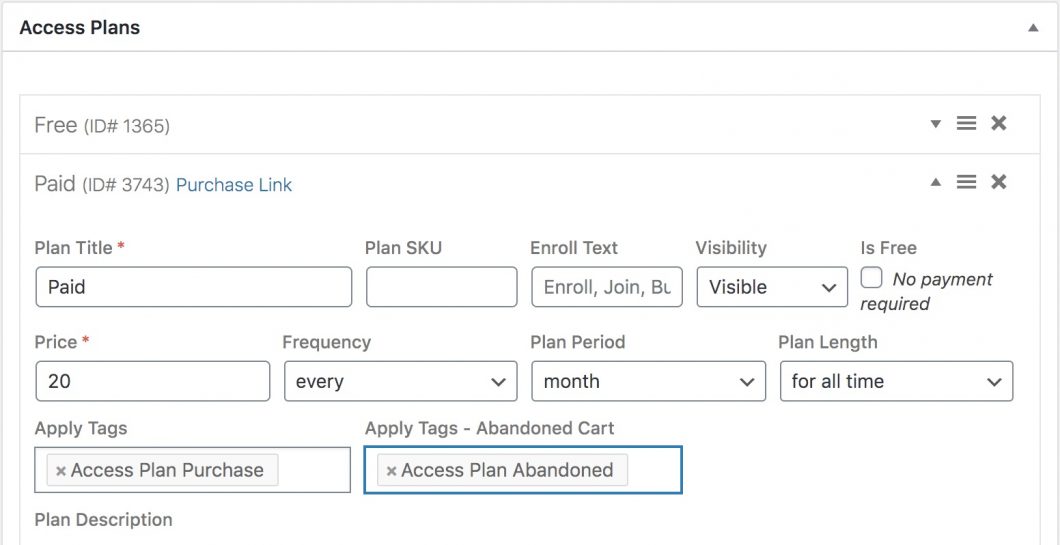
With LifterLMS, cart abandonment tags can be set up specific to each access plan.
#MemberPress
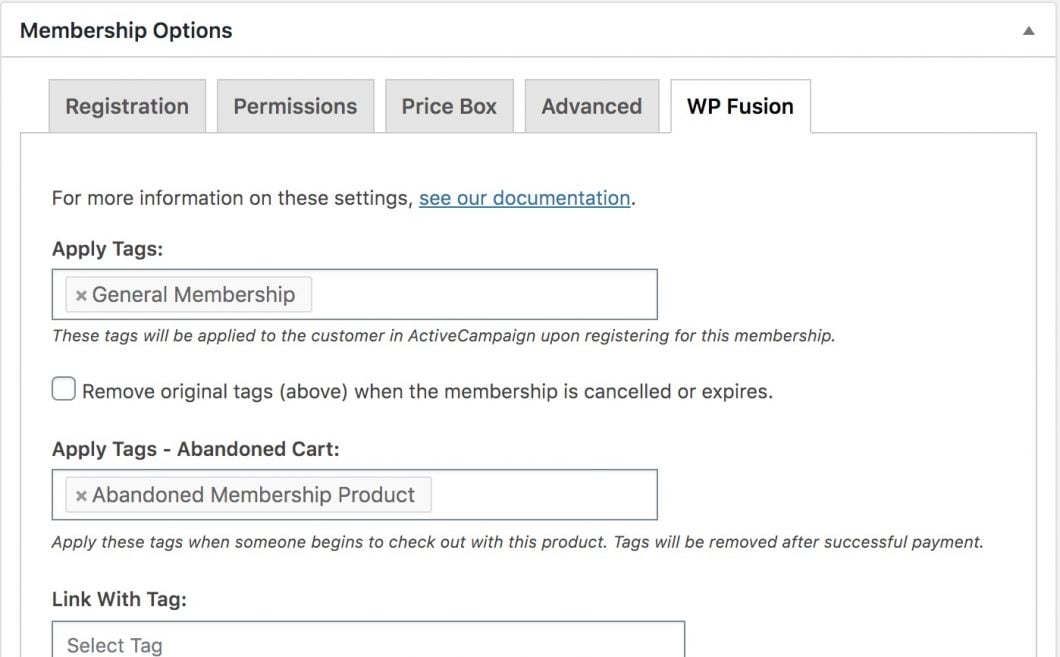
With MemberPress, cart abandonment tags can be set on the WP Fusion tab when editing any membership level.
General settings
With MemberPress you also have the option to delay WP Fusion’s abandoned cart actions until after the first step of the checkout has been submitted.
This can be enabled by selecting Trigger on Submit at Settings » WP Fusion » Addons » Abandoned Cart Tracking.

This is designed to fix situations where a user’s browser might autofill an incorrect email address on the checkout, which then triggers the abandoned cart actions.
#Strategy
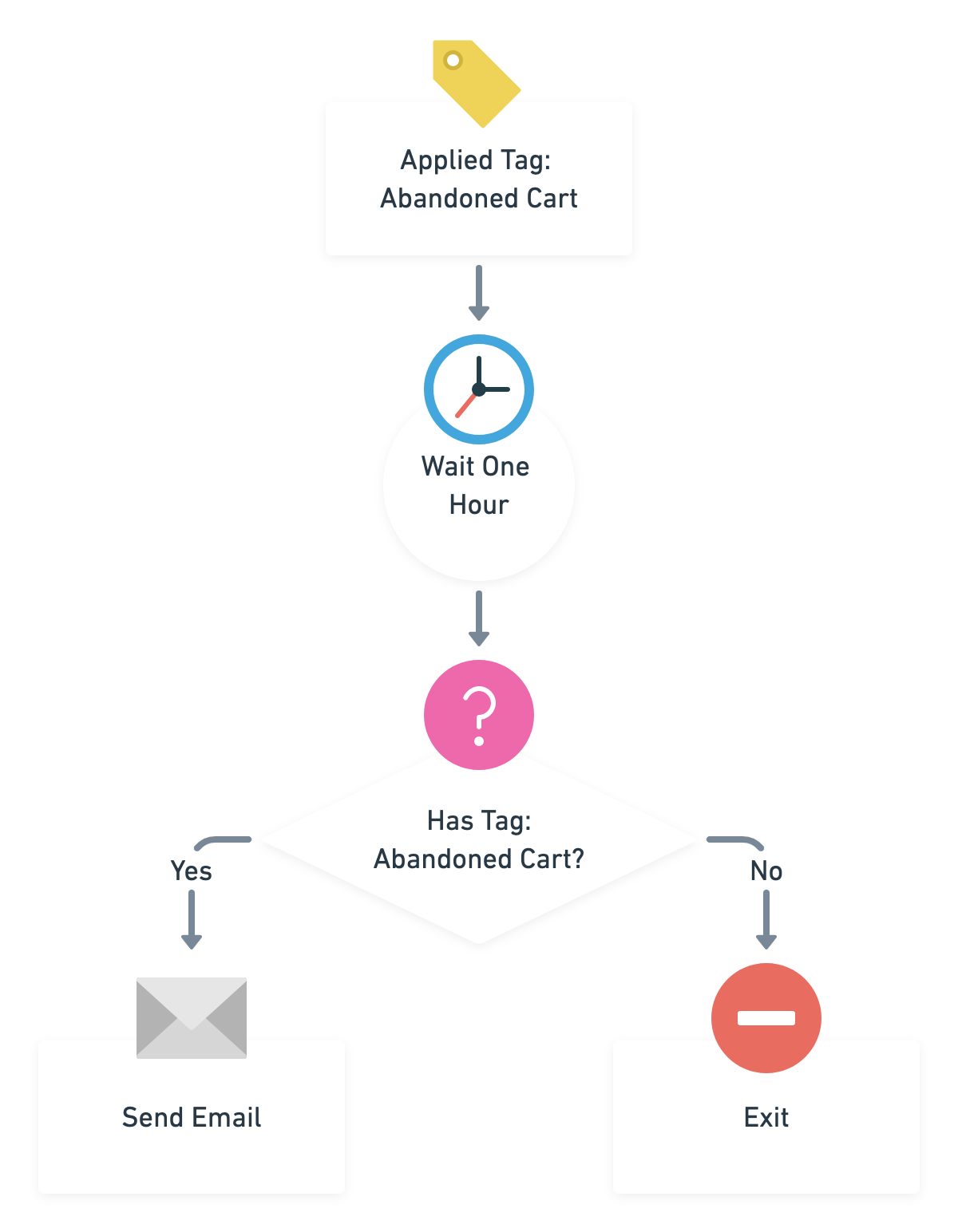
The general strategy for tracking abandoned carts with WP Fusion is to set it to apply tags when a checkout has started.
Because the addon will remove those tags when checkout is completed, you can user timers and logic in your CRM to identify customers who started checkout but haven’t yet completed it.
The Abandoned Cart addon works with all of our CRM integrations. See the other articles in this section for more specific strategies for tracking abandoned carts for specific CRMs.


Reviews
Clear filtersThere are no reviews yet.