 🔑 Software keys sent via WhatsApp or E-mail within 24 hours (1 Day) ! ⏳ If not received, Contact us! ! 📬



 Recently Updated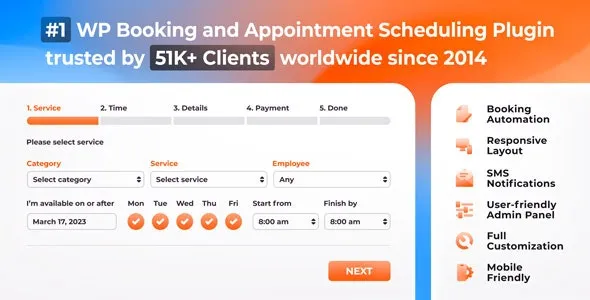

Automated online booking & scheduling for WordPress: fully customizable booking form with online payments, notifications, and Google Calendar sync.
Bookly Pro add-on enables advanced features of Bookly online appointment scheduling plugin. With Bookly Pro, you can remove all the limitations of the free version of Bookly WordPress booking plugin.
The default configuration of Bookly Pro includes:
- Fully-customizable booking form that can be used on any device;
- Filterable, sortable and searchable booking list that you can print or export to CSV;
- Unlimited number of Staff Members with individual working schedules, prices, and ability to manage their profiles and online booking calendar;
- Unlimited number of Services which you can group into categories and set unique colors for easier viewing in Bookly Calendar;
- Importable and exportable customer base with unlimited clients list which displays payments stats and internal notes about the client;
- Various templates for customizable Email and SMS notifications;
- 2-way synchronization between Bookly Calendar and Google Calendar which automatically reflects all updates in Bookly in your Google Calendar;
- Integration with PayPal Express Checkout (note that this method is deprecated as of January 1, 2017 and no longer serviced by PayPal for new customers), the list of completed and pending payments;
- Built-in analytics with booking statistics;
- WooCommerce compatibility;
- Multi-language support – 9 languages included;
- Six months of 24/7 online customer support.
Once you purchase and install Bookly Pro, you will have Bookly plugin and Bookly Pro (Add-on) activated. You are free to add more advanced functionality to your default configuration with various Bookly add-ons for automating your online booking system.
If you use the legacy version of paid Bookly, please update to the latest version. Follow the instructions on the migrator page to switch to the new Bookly Pro with ease and for free.
* Please note that the free version of Bookly may have limited functionality.
Simplify Appointment Scheduling Process with Bookly Pro
Bookly Pro is the best booking plugin for WordPress websites (customer’s words – not ours). The process of booking appointments is fully customizable for your clients. It’s anywhere from 2 to 6 easy Steps. Here’s a walkthrough of the user experience in the standard 6-Step scheduling process.
This piece touches on add-ons, and focuses more on the standard booking plugin. Check out our add-ons and the deeper customization options they provide.
Step 1: Choose Service
Upon arrival at the page containing the booking plugin, the client enters the following information:
- Desired service
- Desired staff member
- Desired date and time
Note: Let customers decide on the number of people they wish to book. How: With Group Booking add-on, increase the capacity of a service in the Services tab and untick the ‘Number of Persons’ checkbox while integrating the plugin with your pages.
Service Extras, one of our most popular add-ons, allows you to add extra products or services to an appointment. When added, a new step will appear in the booking process, pictured below.
Step 2. Pick a Time Slot
Based on the preferred date & time, the booking system offers a list of available time slots. The customer can browse through the scheduling list and choose the time that suits them.
You can customize the available dates that are displayed to clients. You can also change the appearance, like having each day in a separate column. See how here.
Step 3 (optional): Book Multiple Appointments in One Session
With the Cart add-on, your clients can book multiple appointments in one booking session. This feature adds an option to ‘book more’ right after Step 2. The ‘book more’ button will bring them back to Step 1, while storing the current booking on their cart (How to set up the Cart Add-on).
Two add-ons are worth mentioning at this point. The Chain Appointments add-on allows the client to book different services in one visit. For example in a dentist’s office: a cleaning, whitening and check-up can be booked in sequence.
Multiply Appointments add-on allows your client to book identical services back-to-back. This is useful for group bookings where clients are assisted individually.
All booked appointments will be displayed together with their dates, times, staff members, and prices.
Step 4: User Info
Here’s where customers insert info for organizational or marketing purposes. The defaults are name, phone number and email. These fields cannot be removed, but the phone number can be replaced with a Skype ID. More fields can be added as desired.
Your customers can also leave notes here on the booking system. Like their favourite spa cocktail or a request for parking space.
Step 5: Payment
The customer can choose between multiple payment options, including offline payment (cash on arrival). There are 10+ online payment options that you can choose from and enable for your plugin. Read more on these options and how to set them up.
You can integrate and offer coupons, like this.
Should you offer any free services (price set to 0), this step will be skipped.
Step 6: Booking Confirmation
Appointment confirmed. If you’ve set up notifications (highly recommended), a confirmation email and a text message (SMS) with booking details are sent to the customer. See how to set notifications up with this video, or this help document.
If you have switched on the pending appointments feature, we recommend that you change the wording of this last step. An acknowledgement or heads-up to say that you’ll be in touch to confirm the booking would be better.
Simple and easy, isn’t it?
What makes Bookly different to other booking plugins is our world class support and fantastic customization options. Try Bookly Pro demo for free.
If you need any more information on Bookly Pro, feel free to visit our YouTube page and learn more about our epic booking plugin for WordPress.
We advise getting a quality booking plugin for WordPress. Clients appreciate a smooth, easy booking process.
All you could want to know about Bookly Pro as a WordPress Plugin
You’re halfway there, but you need more information to make sure Bookly Pro is the perfect booking system for you. Whether you’re a developer or a business owner.
To see others we’ve helped, feel free to have a look at our reviews section.
Otherwise, read on to wisen up.
What is Bookly Pro?
Bookly Pro is an add-on which requires the Bookly plugin for WordPress websites. With Bookly, your clients can make bookings for service right on your site. No need for time-consuming phone calls or face-to-face meetings.
According to many reviews, Bookly is the best booking plugin for WP. It’s a unique booking system that is under constant development to stay on top. Our programmers never stop working to satisfy your requests and concerns.
So if you’re ready to automate booking on your (or your client’s) website, Bookly could be the appointment software you’re looking for.
What you would need to replicate Bookly – without Bookly?
If you wanted your website to accept bookings online, you would choose Bookly, right? But what if you didn’t?
First of all, you’d need an expert programmer to set a booking system up on your website. If you didn’t wish to keep this expert on your payroll, you’d need to train up one of your current employees to keep it all running. This first step costs time and money.
Next you would have to train each of your staff members on how to use this software. This can also cost a lot of time, depending on how complicated the system is.
Then you would have to hire someone in a secretarial role to handle the bookings and allocate staff members.
It could become quite a messy business.
That’s why Bookly is such a great plugin. It takes all of these moving parts out and adds them into a simple plugin with powerful capabilities.
Let’s take a look at some of those capabilities.
What does Bookly Pro have to offer?
* Some features require add-ons, but most don’t.
* Bookly is in a state of constant development, depending on what the community wants. Thanks to our feature request page, you decide what we develop.
Intuitive WordPress admin panelWhether you’re a WP pro or beginner, our clean panel design will suit your skills and preferences. You can set Bookly Pro up with almost no effort and have a world-class booking system working for you in no time. Managing features and appointments couldn’t be easier. |
Sleek, simple designThe interface has been smartly designed to fit into any web page. A booking system wouldn’t be much use if it stuck out like a sore thumb now, would it? The booking page is simply designed to make using it a breeze. Your clients will breeze through it and be knocking at your door in no time. Not only that, but booking an appointment from your website is sure to impress those customers. |
Customize Bookly Pro to suit any needThe booking form is fully customizable to suit your style and business. With this revolutionary booking plugin, you can:
Whatever your customization needs, Bookly’s got you covered. |
Add unlimited number of booking forms on your siteBookly Pro allows you create and publish multiple booking forms within your WordPress website. All appointments booked in those booking forms will appear in one place – your Bookly Calendar. |
Send SMS and email notifications and reminders to team members – avoid missed or late bookingsYou and your staff will always stay on the game. Reminders of upcoming and updated appointments made through the booking plugin will make sure of it. Never miss a booking again. |
Keep your clients informed tooIt won’t do much good if your staff are on time but your clients aren’t. Your clients will get notifications on pending, approved and cancelled bookings. Again, the notifications are customizable. Remind clients about bookings, thank customers, personalize your messages. You can even send next day agenda’s to staff and combined notifications for cart purchases. |
Switch calendar viewsChoose between daily, weekly, and monthly modes to view your company workload in different ways. |
Let clients book on the go with full mobile integrationThe booking form automatically readjusts itself to fit your mobile site. This way your clients can use the booking plugin anywhere, at any time.The backend also adapts to fit your mobile screen, so you can manage your bookings on the go, too. Because it’s your job to take of the clients, and ours to take care of you. |
Add unlimited services and staff membersWhether your business is a one-man operation or a mega corporation, Bookly Pro adapts to suit you. You can:
Everything you would expect from a booking plugin, and more. |
Let clients book in their native language with full translation supportBookly Pro is compatible with WPML, supporting multi-language websites. The .po and .mo files allow you to translate your Bookly Pro installation yourself, if desired.The plugin comes with 9 built in languages:
|
Integrate Woocommerce into your Bookly ProIf you need a booking plugin for your WordPress store page, we’ve got you covered yet again. Woocommerce integration allows you to use their payment gateways – for both the budding entrepreneur and established business professional. |
Manage your customer base effortlesslyDon’t let your client base get out of hand. With Bookly Pro you get an unlimited, sortable and searchable customer list. But that’s not all. You can also:
|
Set different prices for different staff membersHave you got different staff members at different skill levels? You can add prices to reflect that with Bookly Pro, allowing your customers a choice. Choice breeds satisfaction, and satisfaction keeps clients coming back for more! |
Add custom schedules for individual staff membersYour team doesn’t have to stick to generic business hours. You can discuss and create individual booking hours for each staff member on the Bookly Pro plugin. You can also add breaks and annual leave right from the plugin. Not what you’d expect from a standard booking plugin, but that’s what we do – surpass expectations. |
Synchronize Bookly Pro with your Google CalendarWith Google Calendar and Bookly Pro you can manage your staff workload, hours and bookings with maximum efficiency. Most only offer a one-way sync, but as usual we’ve gone one step further. Google Calendar syncs with Bookly Pro and Bookly Pro syncs with Google Calendar to make a rare two way sync possible! Time slots booked in Bookly Pro are automatically marked as busy in your Google Calendar. And busy slots in Google Calendar are taken into account when Bookly Pro proposes available time slots to clients. |
Receive secure and flexible paymentsSecure online payments and cash on delivery work together to make your service accessible to all your clients. Paypal Express Checkout is included in Bookly Pro, and there are various add-ons for payment gateways which can be integrated with Bookly Pro to help drive more customers from the booking plugin right to your door. You can also filter and sort a list of complete and pending payments with payment reporting. And hide the payment step for free services. Customization is key for a booking plugin (especially for WordPress), and Bookly Pro has tons of that. |
Sort services by categoriesWith Bookly Pro, you’ll have a wide range of options on every service. Including:
…and more! |
Import or Export DataYou can export just about all data in the plugin. This includes:
And you can import data, such as client databases. As a top booking plugin for WordPress, Bookly Pro strives to offer convenience to clients, business owners and developers – and that’s just what it does. |
Confirm your bookings manuallyYou can have appointments created in pending status. They’ll stay this way until you confirm them. Great for when you’re in a period of uncertain availability. |
Add off daysYou can set weekends, holidays or days off for your entire staff roll, or for individual staff members. |
Set different appointment lengths and padding timeAll services are not created equal. We understand that and that’s why each service can have different durations. If your appointments require prep (or you need coffee between appointments) there’s the padding time option to make sure you don’t get overwhelmed. |
Let customers view and edit bookings onlineAdd a booking list (automatically updated) to your website. If your client wishes to view their appointments, they can login with their credentials, which are automatically sent to them by Bookly Pro if you choose to create WordPress accounts for all customers. They can then view or cancel their appointments – giving them flexibility and increasing client satisfaction. |
Keep track of appointments by color-coding servicesYou can assign unique colors to each of your services in the WordPress backend. That way you can keep track of appointments. This aids visual scheduling, making your life easier. |
Add a handy progress barThe handy progress bar will show clients how far in the booking process they are. This way they don’t get frustrated by a longer booking process – they know exactly what to expect. |
Set minimum notice periods for cancellationsYou can set a minimum notice period (eg. 24, 48 hours) for cancellations. Should the client cancel in time, this will not affect them. But it will prevent them cancelling on short notice. |
Let your clients cancel when life catches up to themSometimes life happens, and we can’t make our appointments. Bookly Pro’s cancellation process makes it easy for clients to cancel – and shows your flexibility. The cancellation only works when it is outside of the minimum notice period, however. |
Built-in analyticsGet a clear insight on how effectively your company works by viewing statistics for bookings, customers and payments received right in Bookly Pro admin area. |
Take advantage of the Bookly shopping cart
With the Cart add-on enabled, your clients can return to the 1st page and make another booking. This way, they can order a number of bookings and pay for all of them in advance. |
Build your own form
Custom Fields Add-on allows you to create and add your own custom fields to your booking form – with ease. Bookly Pro is arguably the most customizable booking plugin for WordPress. That’s because we care about your needs. This shows with our feature request page, where you decide what we develop for you next. |
Accept group bookings
Should your appointments be for groups of people, the client can specify the amount of persons they’d like to book for. |
Distribute coupons to increase client loyalty
Clients love promotions and discounts. And we all know the value of time-sensitive offers. With Coupons add-on, you can offer percentage or cash amount discounts for an influx of clients. |
Add extras to your services
The Service Extras add-on (one of our most popular) will allow your clients to book extras with their services. You can add different extras to different services. |
Personal Staff Cabinet for employees
Let your staff members view and manage their bookings, personal details and schedules right after authentication on the frontend with Staff Cabinet add-on. |
Let customers book recurring appointments
With Recurring Appointments add-on, your clients get an option to repeat their visit at a regular interval and schedule a whole series in one session. |
Accept deposit payments
Deposit Payments add-on will let you specify a certain percentage or a fixed deposit amount to be paid online by your customers at the time of booking. |
Let customers choose locations for their appointments
Does your company work in several places around the city or country? With Locations add-on, you can associate staff members and services with different locations, so your clients will be able to choose the place for their appointment before they schedule date and time. |
Let your customers join the waiting list
Avoid losing money when cancellations arise. With the Waiting list add-on you can immediately fill the cancelled appointment with the customer in line. |
Attach files in a booking form
While making a reservation, your customers are able to add multiple appointment-related attachments right on your website. These files then can be viewed or updated in booking details. |
Add special days to the staff’s schedules
Should you wish to set specific working hours for your staff, that differ from the default ones, for extra long or short days of the year, the Special Days add-on will make it possible. |
Is Bookly Pro the right booking plugin for your business?
You can only ask so much from a booking plugin, unless you’re asking Bookly Pro. Unlimited customization, staff and customer management, fully automated – just a few reasons Bookly Pro is regarded as the best booking plugin for WordPress.
If you’re ready to let clients make appointments right on your website, it’s time to choose Bookly Pro.
Just be sure you’re ready to handle the mass of customers Bookly Pro is sure to reel in!
To get Bookly Pro now, just click here.
Updates
Visit our changelog page to stay up-to-date.


