🔑 Software keys sent via WhatsApp or E-mail within 24 hours (1 Day) ! ⏳ If not received, Contact us! ! 📬



 Recently Updated


How it Works
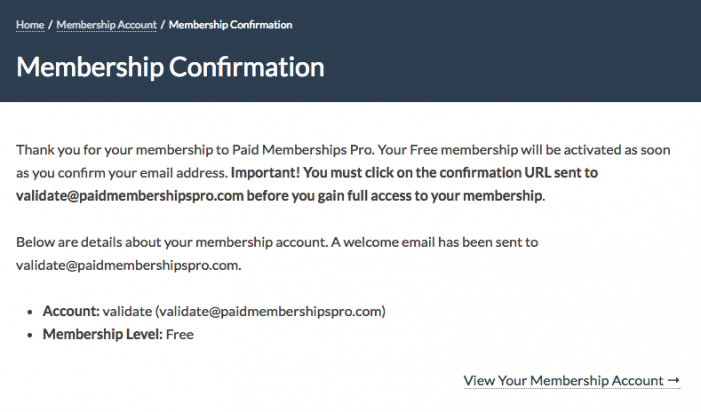
This Add on for Paid Memberships Pro adds a validation link to the membership confirmation email sent to members when signing up for selected levels on your site.
The membership will be active for the user, but access to members-only content will fail until their email address is validated (the pmpro_has_membership_access_filter will return false).
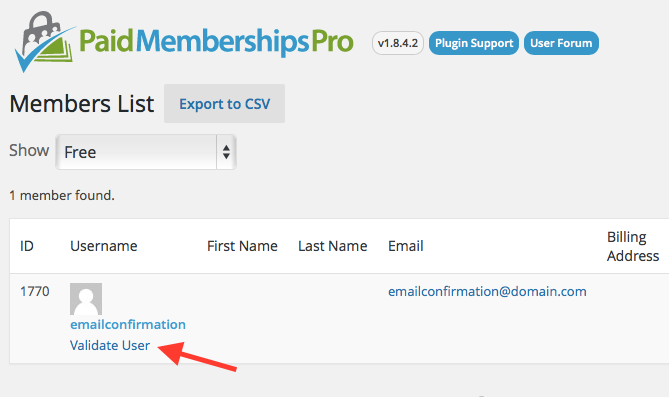
The site admin can also manually validate any user through the dashboard by clicking the “Validate User” button on the Memberships > Members List or Users admin page.
Video Demo
Installation
You must have the Paid Memberships Pro plugin installed and activated with a valid license type to use this Add On.
- Navigate to Memberships > Add Ons in the WordPress admin.
- Locate the Add On and click “Install Now”.
- To install this plugin manually, download the .zip file above, then upload the compressed directory via the Plugins > Add New > Upload Plugin screen in the WordPress admin.
- Activate the plugin through the Plugins screen in the WordPress admin.
Edit your Paid Memberships Pro levels and check the “require email validation for this level” checkbox.

How to Manually Validate a User (as Administrator or Membership Manager)
The Administrator or Membership Manager can manually validate any user through the dashboard by clicking the “Validate User” button on the Memberships > Members List or Users admin page.
You can validate a user from the Memberships > Members List or the Users admin page. Just hover over the username and a link to “Validate User” will appear.
Screenshot