 🔑 Software keys sent via WhatsApp or E-mail within 24 hours (1 Day) ! ⏳ If not received, Contact us! ! 📬



 Recently Updated

Gravity Forms Auto Login
Automatically login a user after they have registered on your website via a Gravity Form
What does it do?
This plugin allows you to automatically log the user in after they have registered (via a Gravity Form) to your site. Additionally, this perk maintains the existing form confirmation allowing you to display a text confirmation, redirect to a WordPress page, or redirect to a URL with no extra effort.
Features
- Automatically log the user in after they have registered.
Save your users time and effort. - Compatible with existing Form Confirmation.
Auto login happens behind the scenes. - Redirect after login.
Redirect the user to another page after automatic login. - Integrates with Gravity Forms Better User Activation.
Automatically log users in after they activate with Gravity Forms Better User Activation, also part of the Gravity Perks plugin suite. - Automatic updates.
Get updates and the latest features right in your dashboard. - Awesome support.
We’re here to help! And we mean it.
Documentation
How do I enable this functionality?
This perk requires the Gravity Forms User Registration Add-On. Assuming this add-on is installed and activated, go ahead and navigate to the User Registration page. On the User Registration page, follow the steps below to enable Auto Login.
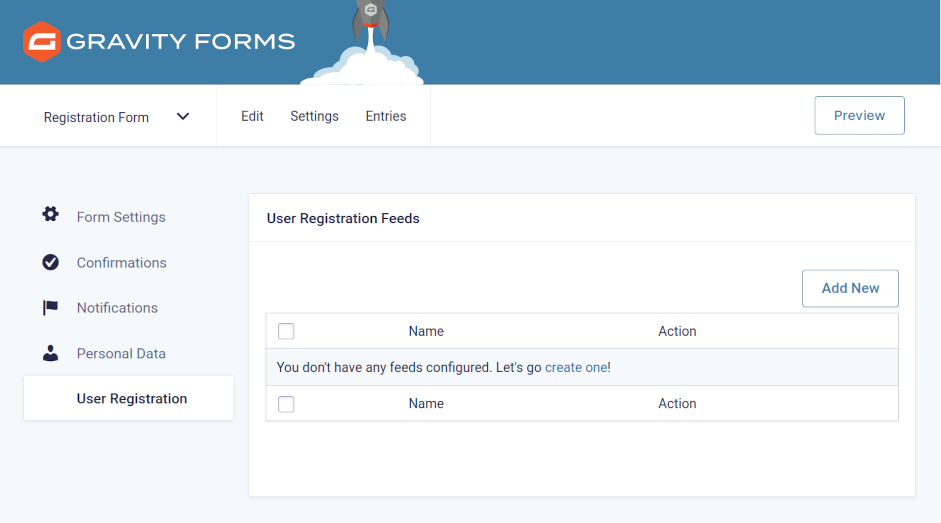 |
Create a new registration feed or edit an existing feed. |
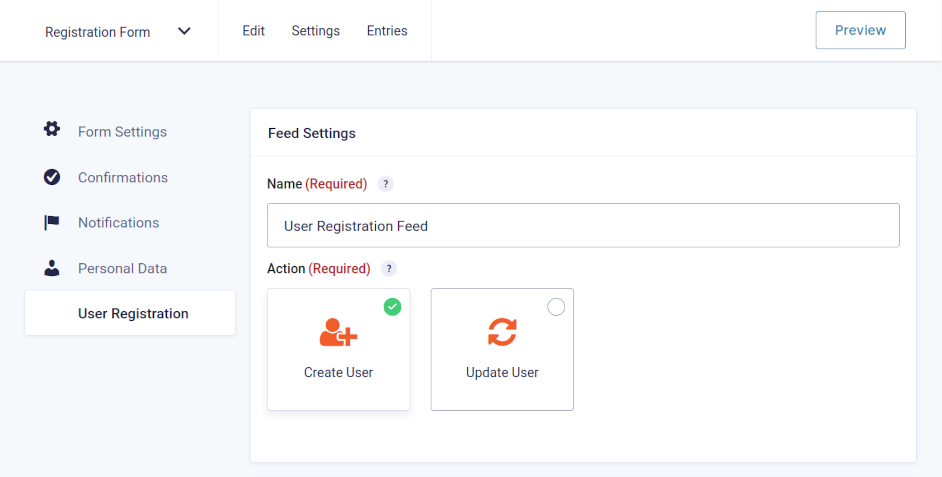 |
Name your feed and select Create User. Skip this step if editing an existing feed. |
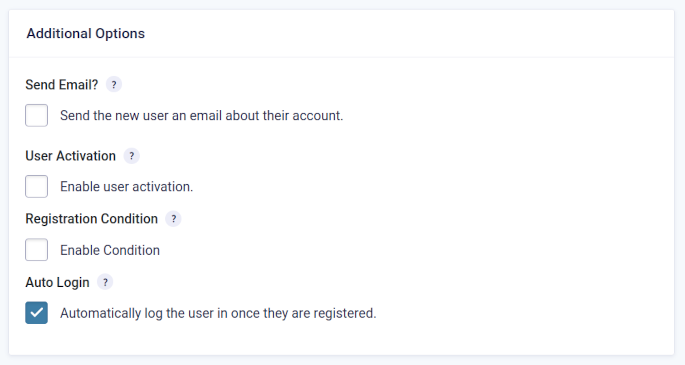 |
Scroll to the bottom of the feed and check Automatically log the user in once they are registered. |
With this option enabled, any user that is registered from this feed will automatically be logged in when the form is submitted.
Feature Details
Redirect After Login
The auto login functionality happens behind the scenes and the form’s configured confirmation settings are not impacted by enabling this feature. If you would like to redirect the user to another page after they have been automatically logged in, you can configure the URL to which the user should be redirected on the “Confirmation” tab of your Form Settings.Setting Redirect URL via Confirmation
User Activation
If User Activation is turned on for your feed, GF Auto Login will automatically log the user in after they have activated their account, with one caveat. The default activation template packaged with Gravity Forms (and modeled after WordPress’ version) does not give any indication that the user is logged in.
GF Auto Login automatically integrates with GF Better User Activation, which you can use to customize the activation page and indicate to the user that they have been logged in.
Known Limitations
- As of GF Auto Login 2.0, auto-login will only work for up to 24 hours after the initial registration. This can be extended if needed. Contact Support for details.
Translations
You can use the free Loco Translate plugin to create translations for any of our Perks. If you’ve never used Loco translate before, here’s a tutorial written for beginners.


Reviews
Clear filtersThere are no reviews yet.