 🔑 Software keys sent via WhatsApp or E-mail within 24 hours (1 Day) ! ⏳ If not received, Contact us! ! 📬



 Recently Updated

Gravity Forms Read Only
Configure applicable form fields to be set to a read only state so that they are visible but not editable.
What does it do?
This plugin allows you to configure applicable form fields to be set to a read only state. Fields set to read only will be visible, but not editable. In other words, the user can “read” the field value but can not change the field value.
This is useful in situations where you would like to present information to the user without the user being able to modify that data. This comes in handy when populating fields using Populate Anything, calculating quantities with Nested Forms, or anywhere that you want to include a Default Value without the user overwriting it.
Features
- Set form fields to read only.
Added directly for form markup with no additional Javascript. - Supports most Gravity Forms fields.
All fields that support user input can be made read only. - Automatic updates.
Get updates and latest features right in your dashboard. - Awesome support.
We’re here to help! And we mean it.
Documentation
How do I enable this functionality?
After installing Gravity Forms Read Only, you can set any supported field as read-only. Let’s step through that process.
 |
Navigate to the Perks tab for any applicable field and check Real-only to activate. |
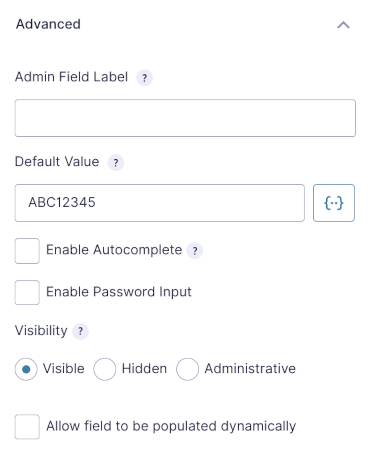 |
Navigate to the Advanced tab and specify a default value for the field. |
Merge tags can be used in field Default Values. For even more flexibility, use Populate Anything’s Live Merge Tags.
Feature Details
How does it work?
When the form loads, the Read Only checks for any field marked as read only. When enabled, the readonly HTML attribute is appended to the input or textarea tag when the field markup is generated by Gravity Forms.
Some fields, like Drop Downs (i.e. selects), do not natively support the readonly attribute. For these fields, we use the disabled attribute. By default, disabled field values are not submitted with the form. We overcome this limitation by capturing the value of the field in hidden input.
Some read only solutions rely on Javascript for setting fields as read only. GF Read Only modifies the markup directly before the form is rendered. This improves the performance and removes an unnecessary dependency on Javascript.
Settings
Activate Read Only by checking Read Only within the Perks tab of any supported field.


Reviews
Clear filtersThere are no reviews yet.