


 Recently Updated Well Documented

Create Customizable PDF Vouchers for In-Store or Online Redemption
PDF Product Vouchers by SkyVerge helps you connect your online store to an on-the-ground business, providing printable gift certificates to be used in person, online, at events, in exchange for free gifts, and more!
With WooCommerce core coupons, you can offer discounts to your customers. However, you can’t sell these coupons as store credit and they can’t be redeemed in-person at your brick-and-mortar locations.
WooCommerce PDF Product Vouchers is perfect for businesses that accept orders online but provide a good or service at a later date or in-person. Vouchers can be used for pre-paid admission to your cooking class, tickets to an event, as gift certificates for in-store purchases, or to provide as redemption for a free gift when visiting a retail location.
Product vouchers also make an attractive gift for customers to purchase for their friends and family, and can be personalized with a recipient name and message.
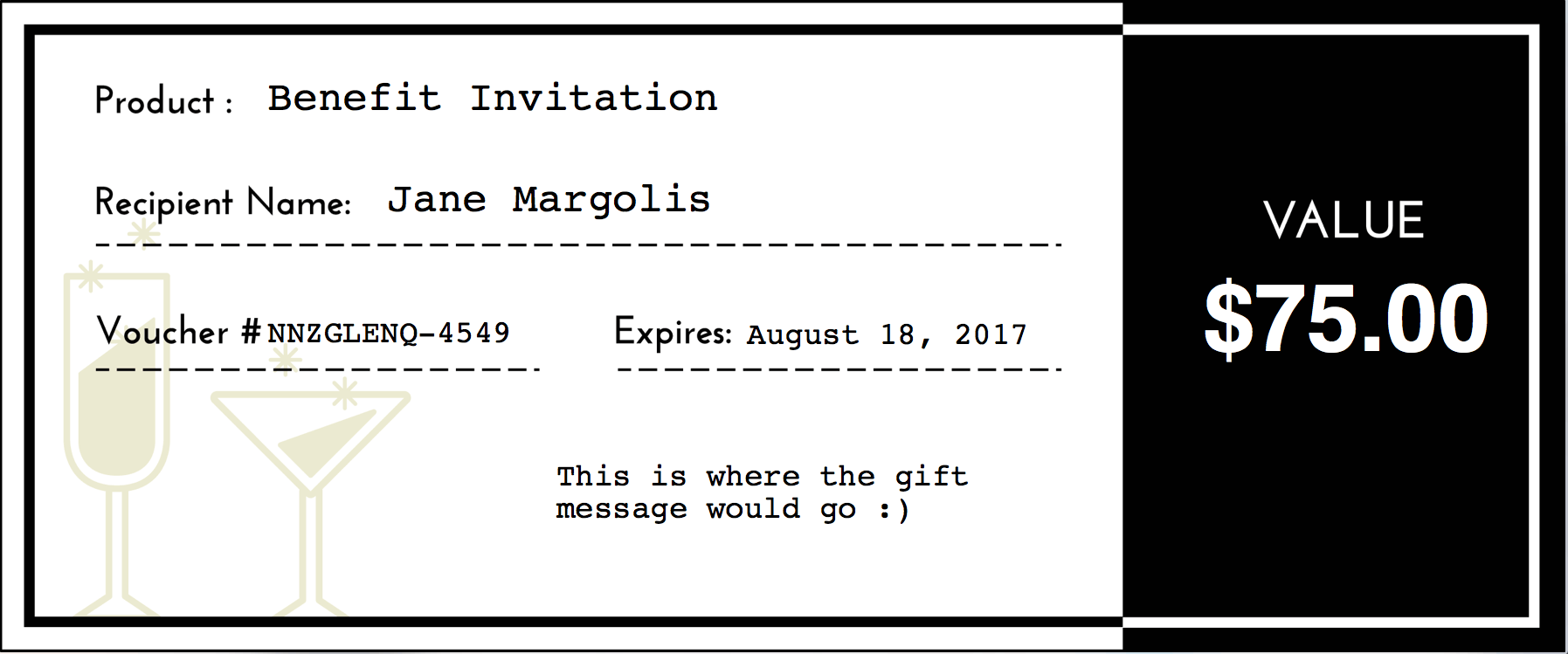
Vouchers can be personalized with information entered by customers, letting you provide certificates to be used in your store or to be given as a gift. You can even let customers redeem vouchers online for purchases in your store as a store credit system.
How can PDF Vouchers Make My Life Easier?
- Customize and sell downloadable PDF vouchers for products or services
- Sell vouchers that can later be redeemed in your online store NEW
- Include QR codes on vouchers so you can quickly redeem them with a single scan NEW
- Creating voucher templates uses a “what you see is what you get” editor
- Includes 6 default voucher backgrounds, or you can upload your own
- Add product details, such as SKU, to customize your vouchers
- Optionally add alternative voucher background images for customers to choose their desired background
- Allow customers to personalize vouchers with a recipient name & message
- View a list of all generated vouchers or search by voucher number to find a customer’s voucher
- Manage vouchers from the voucher list and mark them as redeemed when needed
- Supports partial redemptions and adding multiple redemptions per voucher NEW
- Mark a voucher as voided to block further redemptions NEW
- Allow customers to send vouchers to friends automatically using recipient email
- Manually create vouchers for customers to give away store credit
- Create printable gift certificates with variable amounts by using the Name Your Price extension
Easily Build Voucher Templates
You can build a voucher template, which is attached to products to generate a PDF with your customer’s details. These templates let you place fields on the voucher, edit fonts or color, and more:
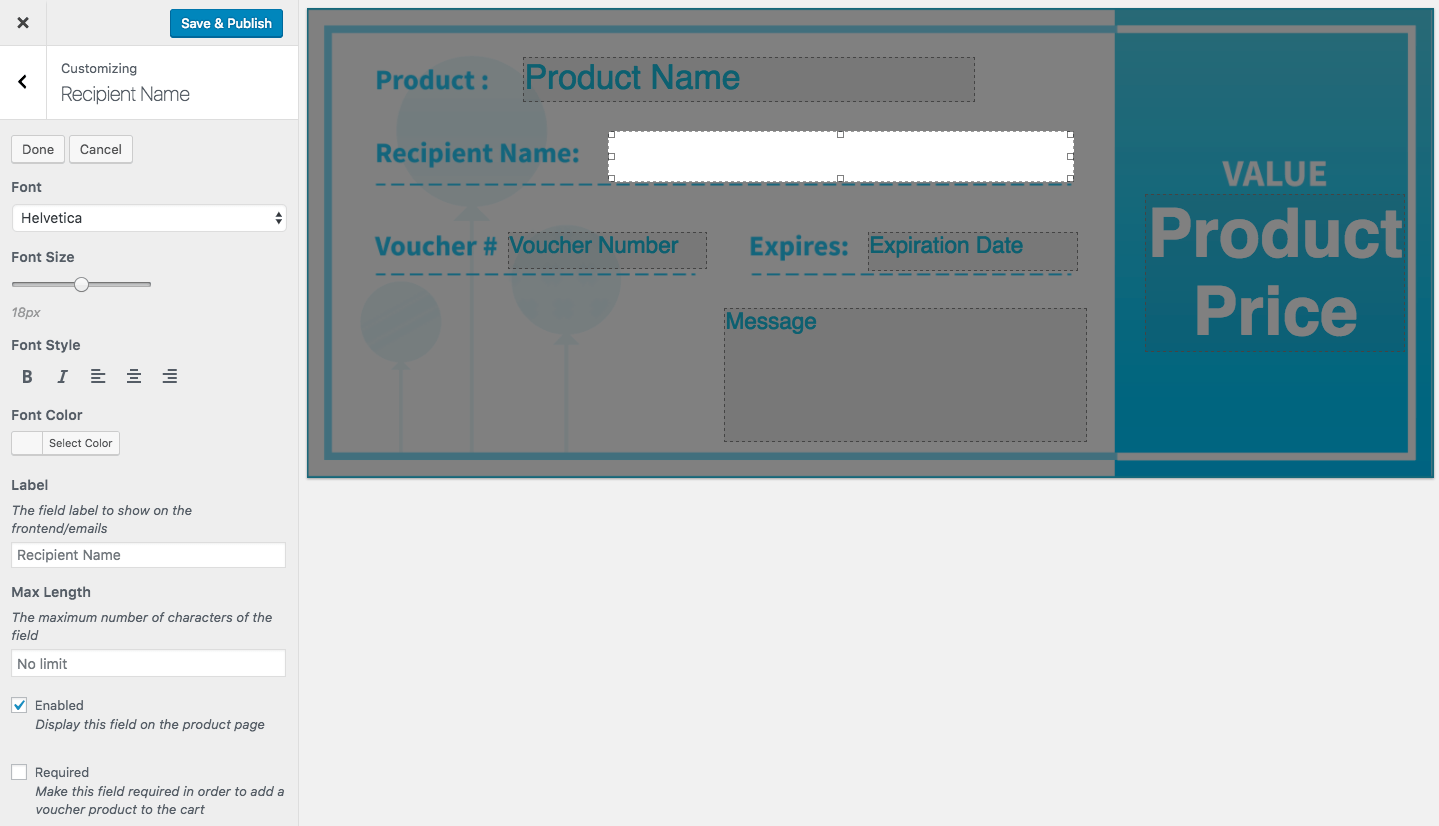
Here’s an example of creating a new voucher template, which lets us add product name, price, recipient name, and other fields to the voucher:
When purchased, these fields will be added to the voucher PDF upon generation.
Simple for Customers, Too
When a customer purchases a voucher, they’ll simply need to fill in the fields for your voucher, which are automatically displayed on the product page as part of the purchasing process. If you’ve added alternative background images, customers can choose the background they’d like to use.
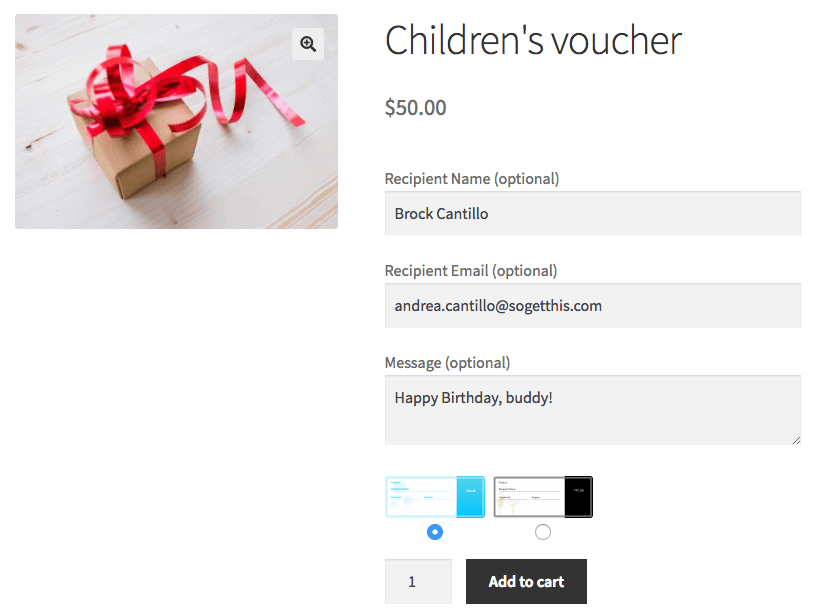
Customers will receive vouchers as attachments to their order emails once the order has been paid for, and if a recipient email is set, the recipient will also get an email with vouchers attached.
Registered customers on your store will be able to download vouchers they’ve purchased from the account area in addition to getting emails with voucher attachments.
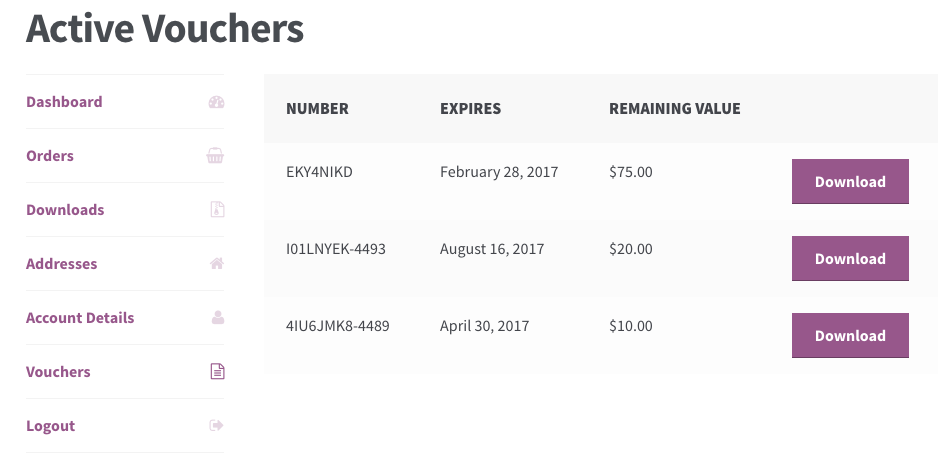
Redeeming vouchers
Want to let your customers purchase vouchers as gift cards or gift certificates? You can do it! Once a voucher has online redemptions enabled, customers can enter their voucher number in the “coupon code” input, and vouchers are automatically applied to the current purchase.
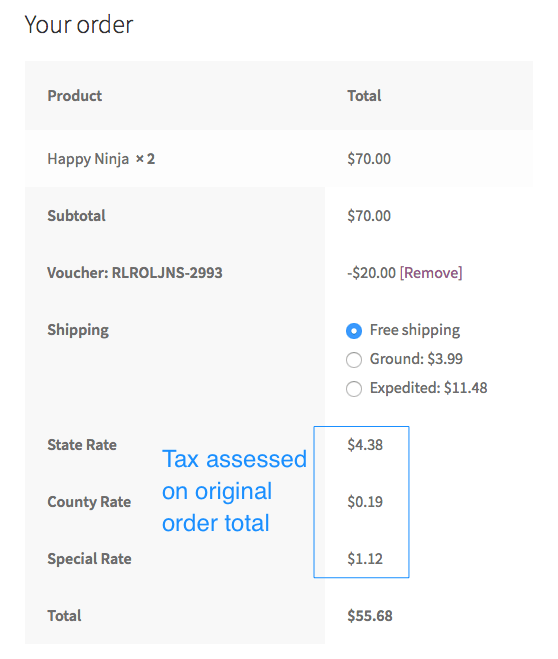
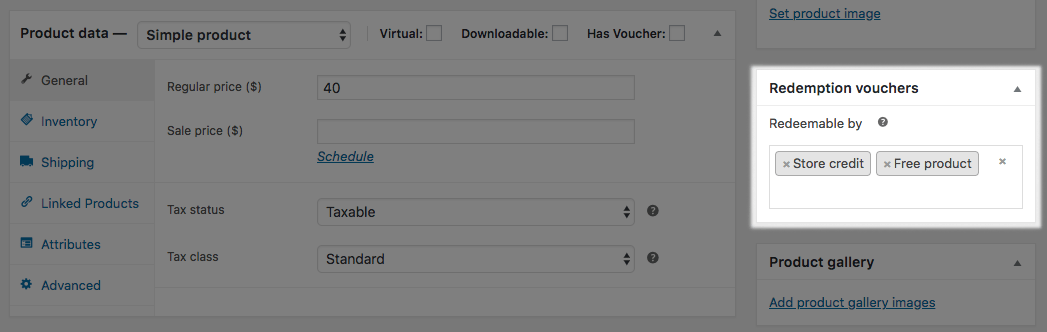
Need to only allow redemption on certain products? Use a single-purpose voucher, and then the voucher is only redeemable on products you specify.
Want to only allow redemptions in-person? You can do that as well! Manual redemptions are supported so you can enter them from your store admin.
Scan QR codes for redemption – NEW
Need to quickly redeem vouchers in-person? Include a QR code on your vouchers! You can then scan the codes with a mobile device to redeem them in seconds. Here’s what it looks like in action:
Voucher Administration Tools
When a voucher is purchased, it will be generated for the customer under your “Vouchers” list. This will show the voucher background, voucher number, and remaining value. You can search this list by fields like voucher number, customer name, recipient, or product purchased to help you quickly add a redemption or lookup voucher details.
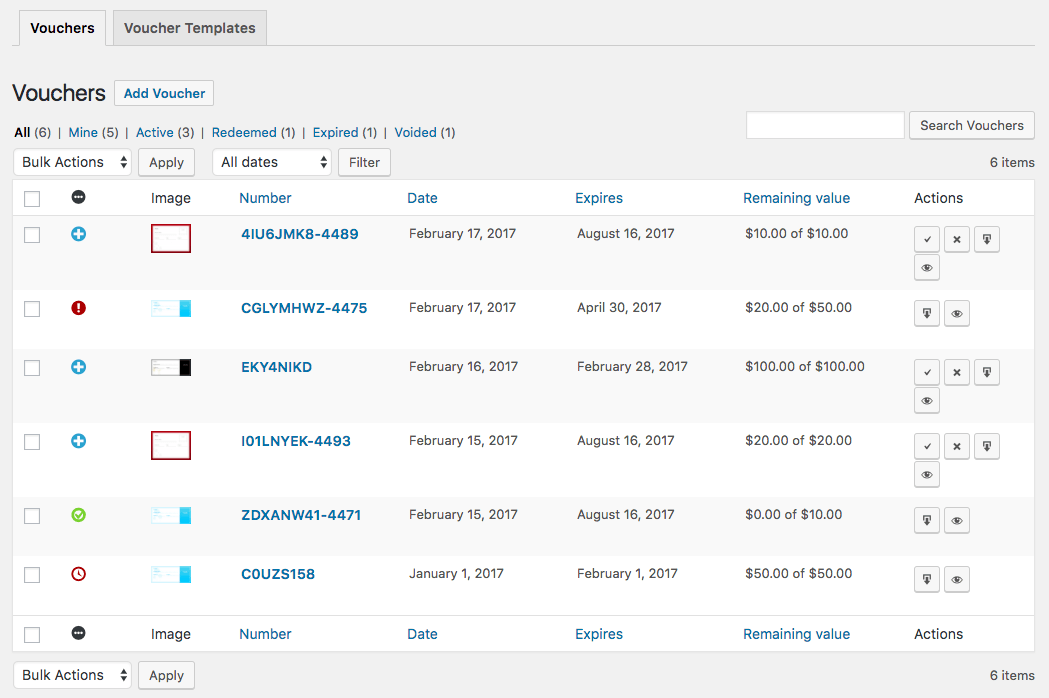
You can even use the quick actions to redeem or void a voucher without needing to view full details, helping you quickly manage vouchers in person!
You can edit voucher details, download voucher PDFs, re-send recipient emails, or modify other voucher information. You can also add redemptions or voids for a voucher using a familiar, “refund-like” interface to reduce the remaining value when a customer uses a voucher in person.
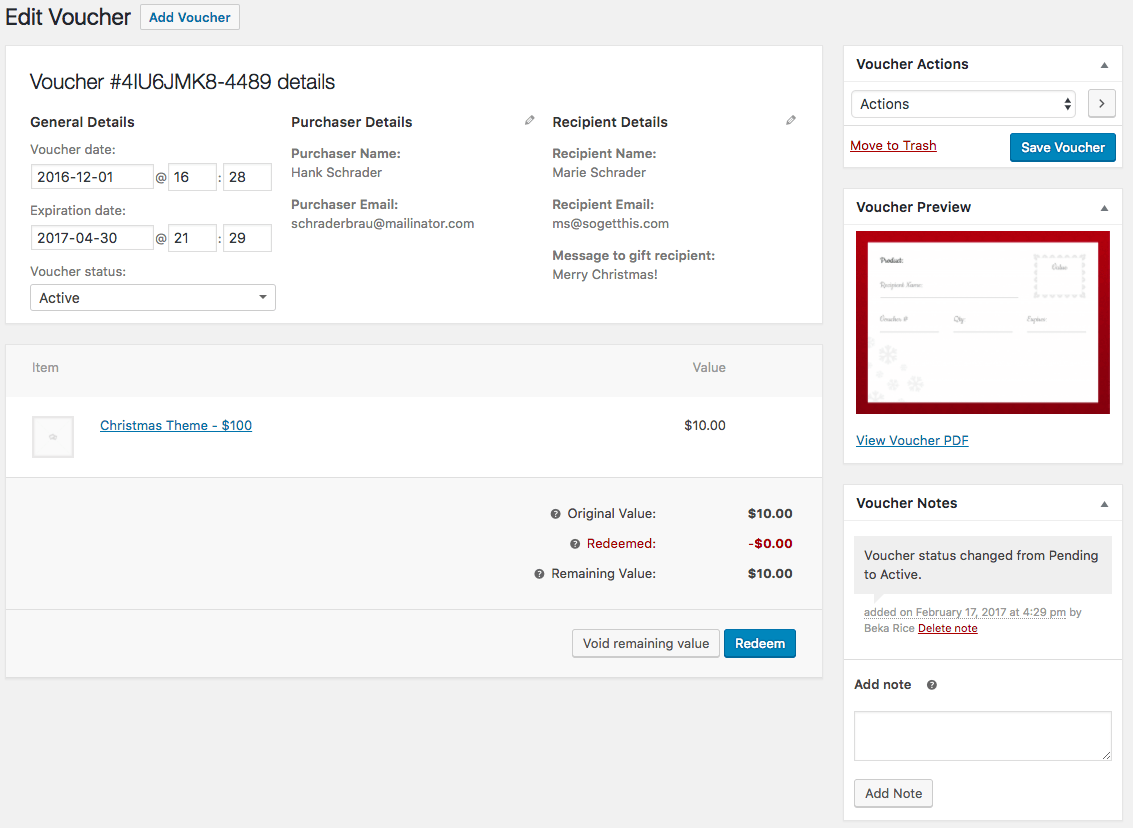
Multiple redemptions can be added if the voucher’s full value is not used on the first visit, ensuring your customers can get the most out of vouchers with your store.
Manually Adding Vouchers
Need to manually add a voucher so you can gift it to a customer? That’s possible as well! The only difference is that voucher numbers will use the 8-character, random voucher number without an order number suffix, but you can manually add voucher details and generate a PDF for your customer.
Support for Name Your Price Extension
Need to sell a voucher without a defined value? PDF Product Vouchers supports the use of the Name Your Price extension so that you can allow customers to enter a value for their voucher to be redeemed. Your voucher can include a price field so you know the amount the customer entered when purchasing.
How to Get Started
- Buy this extension

- Download and install into your WooCommerce store
- Configure voucher templates and attach them to your products
- That’s it! Sit back and let your customers purchase beautiful personalized product vouchers!
Need any more reason to buy? When you purchase a SkyVerge-developed extension, you’re getting the highest quality extensions for your WooCommerce store. Gain peace of mind by knowing that when you purchase our products, your store’s performance is as important to us as it is to you.
Latest Release

Fluent Forms – The Fastest WordPress Form Builder
Original price was: US$299.00.US$4.99Current price is: US$4.99. for 1 year
WizeStore – Multipurpose WooCommerce Shop WordPress
Original price was: US$59.00.US$4.99Current price is: US$4.99. for 1 year
Chelsey – Portfolio Theme for Freelancers and Agencies
Original price was: US$79.00.US$4.99Current price is: US$4.99. for 1 year
Reviews
Clear filtersThere are no reviews yet.