


 Recently Updated Well Documented

Control which Paid WooCommerce Orders are Automatically Completed
WooCommerce automatically completes orders for virtual-downloadable products after successful payment, but it won’t autocomplete other orders, as you may need to take actions between when the order is processed and completed. If you sell shippable products, you probably need to ship them before completing the order. If you sell virtual products like services, you probably have to do something between when the order is paid and completed.
However, this isn’t the case for all stores, and you may not need to take any action between when an order is paid for and completed. For example, you may want to auto-complete virtual orders, or even those with products that aren’t virtual or downloadable. Likewise, you may not want any orders to automatically complete at all.
In this case, you can use the WooCommerce Order Status Control extension to get greater control over when paid orders are automatically completed.
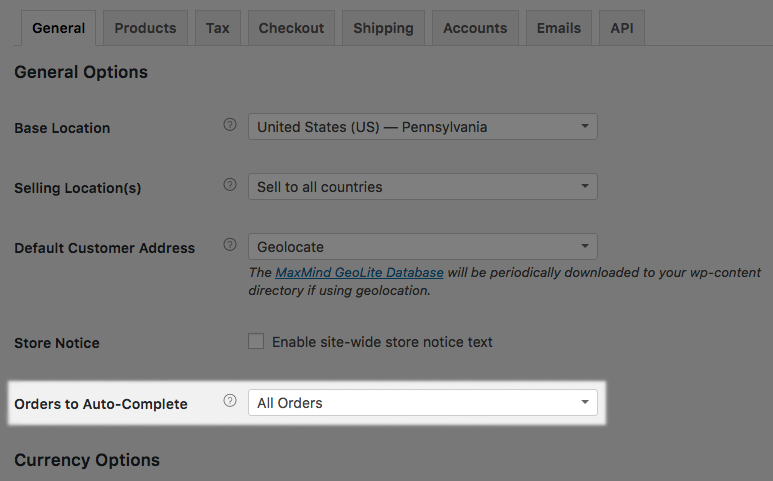
Want to completely prevent orders from automatically completing? You can use this plugin to block virtual + downloadable orders from going right to “completed”.
Need to automatically complete more orders than WooCommerce does by default? You can do that, too. Normally, orders with successful payment are updated from ‘pending’ to ‘processing’. Once the order is processed, you have to manually complete it. If your shop takes a large number of orders that don’t require action while the order is processing, updating the order status to complete for each of those orders is a time commitment that you can instead streamline.
WooCommerce Order Status Control can automatically mark paid orders as ‘complete’ instead of ‘processing’, completing skipping the ‘processing’ status. All it takes is 1 minute to setup and you never have to worry about changing order statuses for paid orders again.
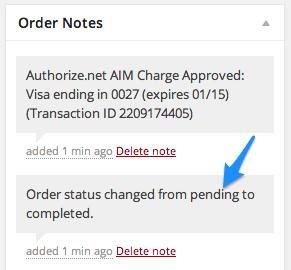
You can automatically complete paid orders that only contain virtual items, or you can opt to automatically complete all paid orders in your shop, regardless of what type of product the order contains.
How to Get Started
- Purchase and download the extension 🙂
- Upload and install into your WooCommerce store
- Go to WooCommerce > Settings > General, and scroll down to Order Status Control
- Choose from All Orders to change the order status to “completed” after successful payment for all orders, Virtual Orders to change the order status only for orders that contain all virtual products, or None to stop auto-completion all together.
- That’s it! Sit back and enjoy automated order statuses!
Need any more reason to buy? When you purchase a SkyVerge-developed extension, you’re getting the highest quality extensions for your WooCommerce store. Gain peace of mind by knowing that when you purchase our products, your store’s performance is as important to us as it is to you.
Latest Release

Fluent Forms – The Fastest WordPress Form Builder
Original price was: US$299.00.US$4.99Current price is: US$4.99. for 1 year
WizeStore – Multipurpose WooCommerce Shop WordPress
Original price was: US$59.00.US$4.99Current price is: US$4.99. for 1 year
Chelsey – Portfolio Theme for Freelancers and Agencies
Original price was: US$79.00.US$4.99Current price is: US$4.99. for 1 year
Reviews
Clear filtersThere are no reviews yet.