


 Recently Updated Well Documented

Completely Customize Product Tabs with WooCommerce Tab Manager
As a WooCommerce store owner, we know you love your products. In fact, you love them so much you probably want to tell your customers everything about them, from dimensions to shipping and manufacturing details. We get it! But you probably want a really polished way to do it on your product pages, right? Tab Manager helps you create professional, informative product pages using easy-to-manage product tabs.
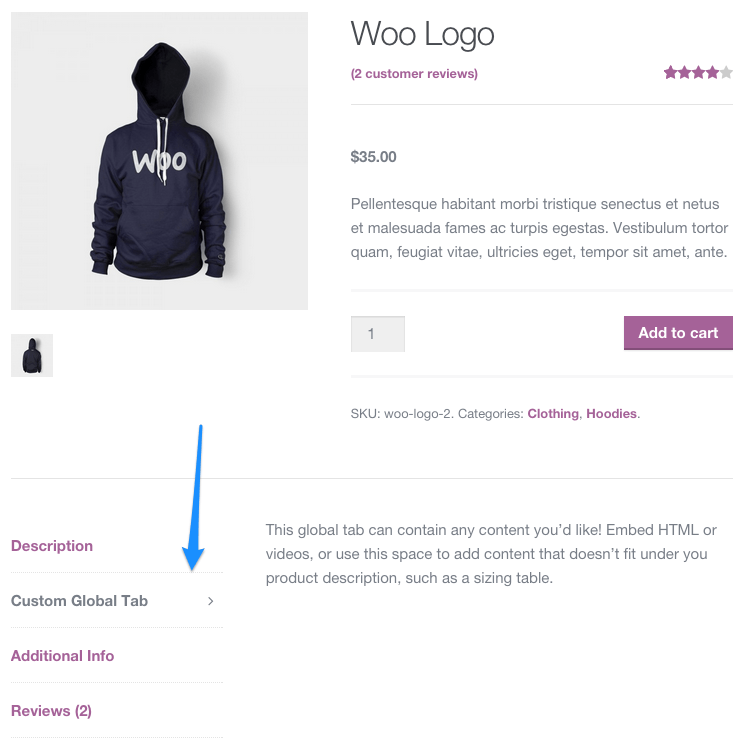
Tab Manager gives you complete control over your product page tabs, allowing you to easily create new tabs for products, share tabs among multiple products, reorder tabs using a visual drag-and-drop interface, and more. No more messing with filters, template files, or modifying your theme; you’ll be able to create custom tabs from the convenience of the WordPress dashboard. Even most 3rd party tabs added by other plugins will be detected, allowing you to hide or order them alongside your own tabs.

What Can Tab Manger Do?
- Core tabs – re-order, remove, or rename the core Description, Additional Information, and Reviews tabs
- 3rd Party tabs – most tabs added by 3rd party plugins will be automatically detected, and will be sortable
- Global tabs – create tabs that can be added to more than one product, allowing for easy content sharing and saving you time!
- Global tabs can also be restricted to display only on certain product categories NEW
- Product level tabs – create tabs that are customized to a specific product.
- Create a default tab layout (re-order as you wish!) that can be applied to all products
- Override the default layout on a per-product basis to customize tabs for a single product.
- Add any number of custom product tabs and order them
- Include tab content in site search results NEW
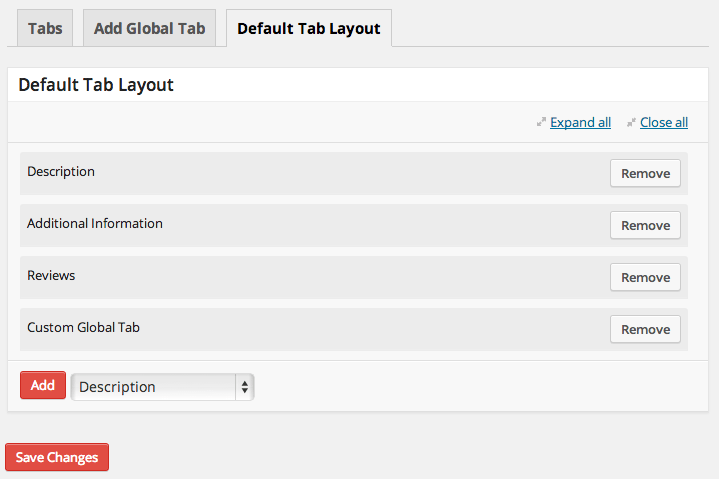
Default Tab Layout
Manage the default tabs for all products in your store (which can be overridden on a per-product basis)! You can re-order tabs, rename them, remove core tabs, and add your own global tabs.
Per-Category Global Tabs – NEW
Need to add global tabs, but only for certain product categories? You can determine which global tabs should show up on which categories, even if the global tab is part of your default layout.
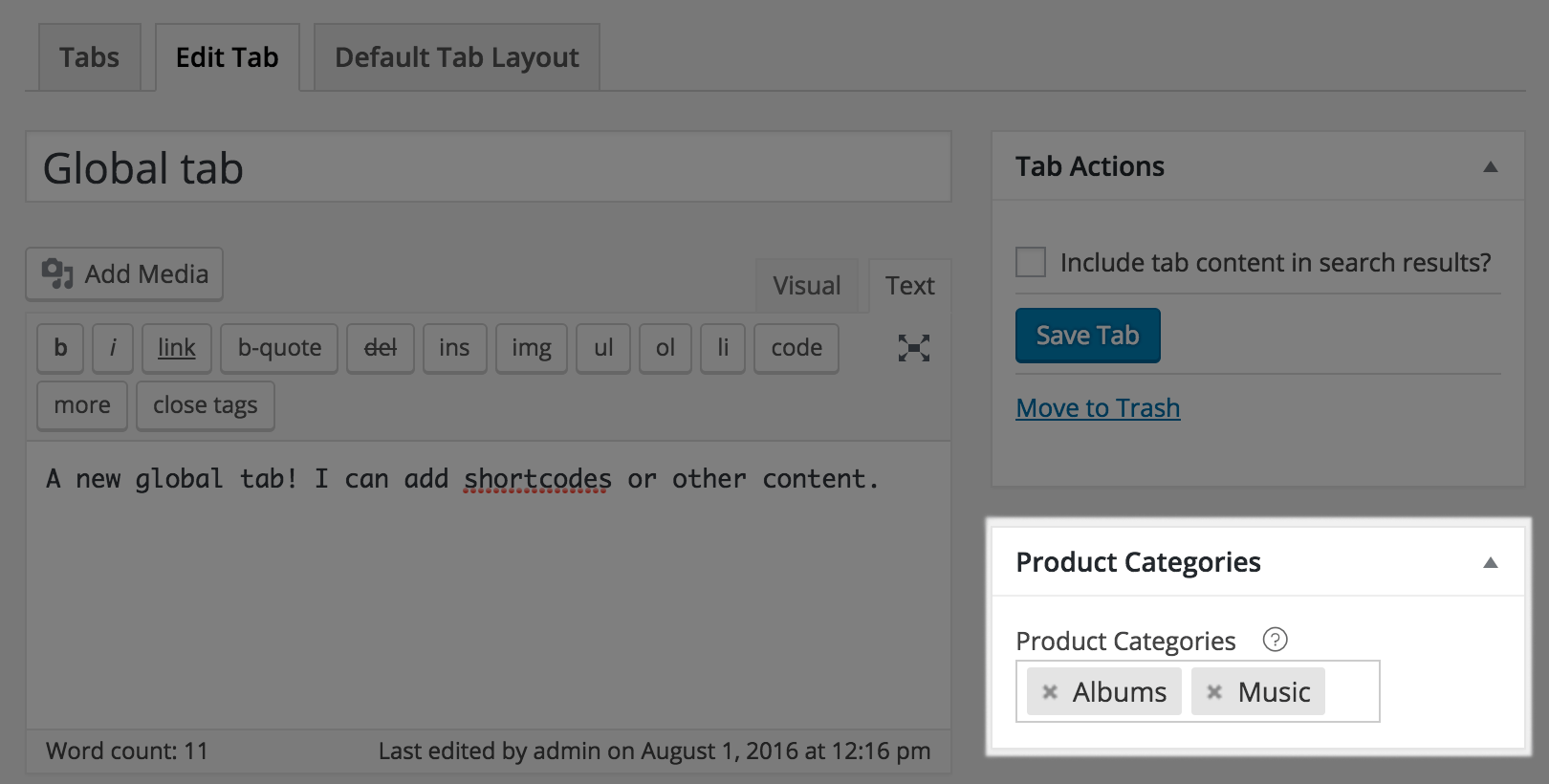
Or, just leave your category selector blank to let global tabs show for any product.
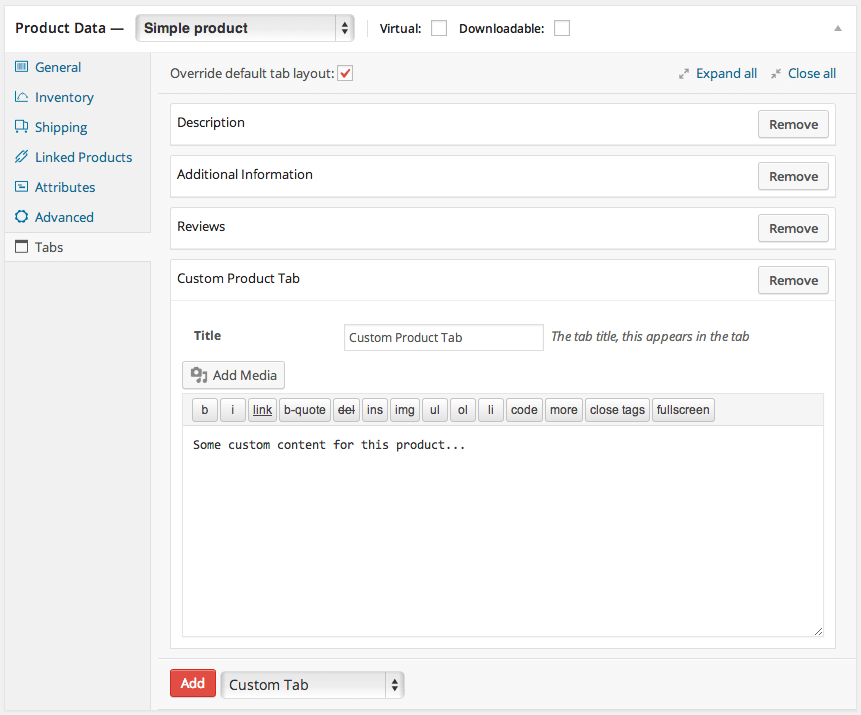
Overriding Product Layout
If a product needs a unique tab layout, or a customized tab, you can override the default tab layout. This lets you re-order tabs for the product, remove tabs from the default layout, add global tabs, or add a customized tab for this product.
Keep Tab Content in Your Search Results
Any product-specific tabs you add will mostly likely contain content. If a customer searches for a keyword in that content, the product will show up as a search result. You can also make global tabs searchable, which is helpful if a global tab is only used on certain products.
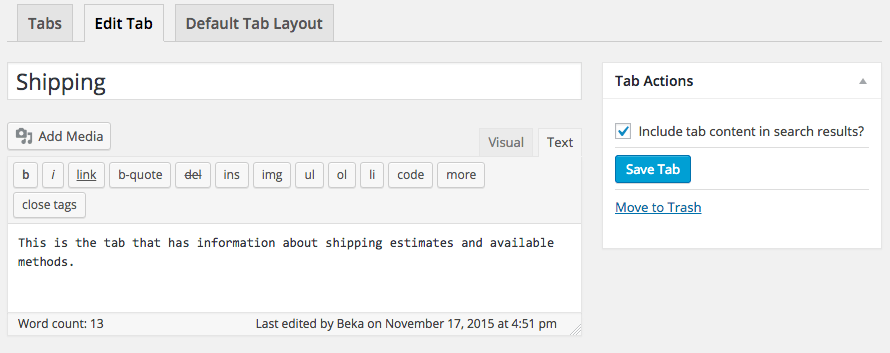
This is even compatible with the popular, free Relevanssi plugin to keep tab content in your search index.
Embed Forms & Information in Tabs
You can use separate tabs to display embedded information, such as videos, images, and more. Shortcodes will be expanded in tab content so you can embed information from other popular plugins like Gravity Forms for pre-sales forms, embed YouTube product explainer videos, or use other shortcodes to modify content display.
How to Get Started (in 5 minutes or less)
- Buy this extension 🙂
- Download and install into your WooCommerce store
- Start adding tabs under Product Data, or add global tabs under WooCommerce > Tab Manager
- That’s it! Sit back and enjoy superbly managed tabs!
Need any more reason to buy? When you purchase a SkyVerge-developed extension, you’re getting the highest quality extensions for your WooCommerce store. Gain peace of mind by knowing that when you purchase our products, your store’s performance is as important to us as it is to you.
Latest Release

Fluent Forms – The Fastest WordPress Form Builder
Original price was: US$299.00.US$4.99Current price is: US$4.99. for 1 year
WizeStore – Multipurpose WooCommerce Shop WordPress
Original price was: US$59.00.US$4.99Current price is: US$4.99. for 1 year
Chelsey – Portfolio Theme for Freelancers and Agencies
Original price was: US$79.00.US$4.99Current price is: US$4.99. for 1 year
Reviews
Clear filtersThere are no reviews yet.