 🔑 Software keys sent via WhatsApp or E-mail within 24 hours (1 Day) ! ⏳ If not received, Contact us! ! 📬



 Recently Updated

WordPress Amazon S3 Storage Plugin

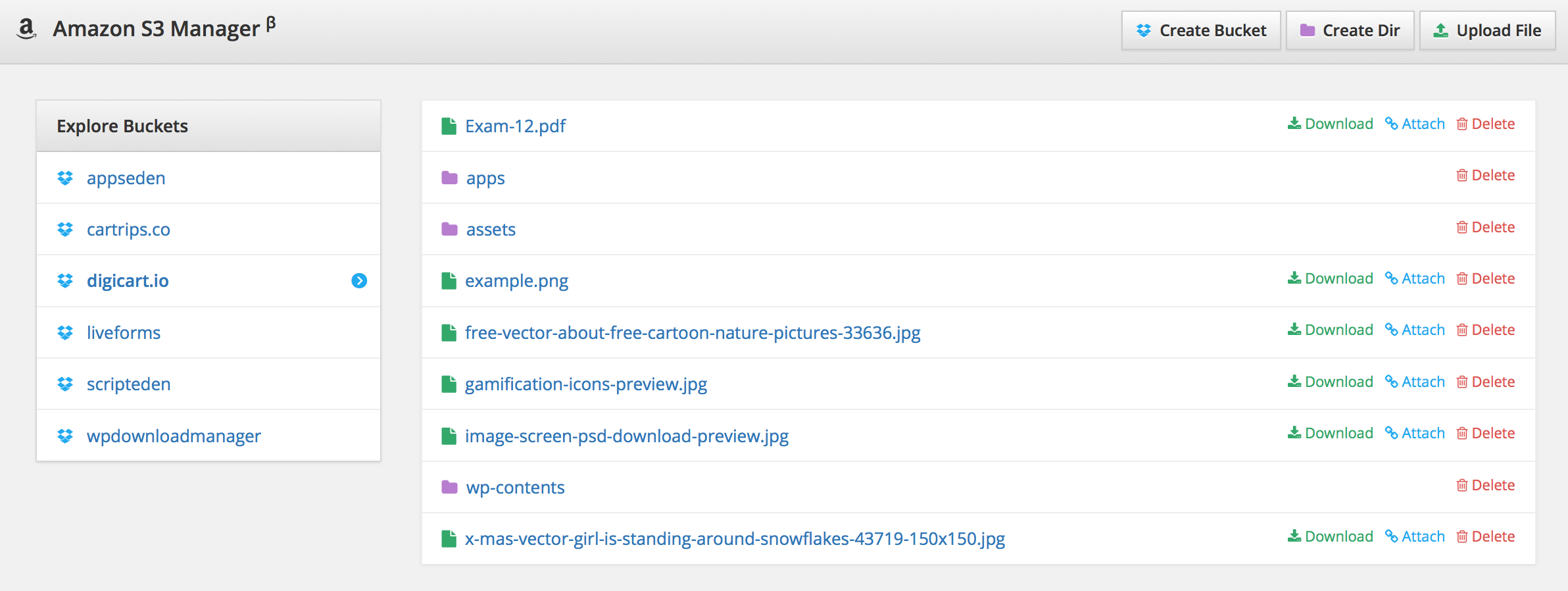
WordPress Amazon S3 Storage Plugin for Download Manager will help you to store your file at Amazon s3 from WordPress Download Manager admin area with a full-featured bucket browser interface. You can create and explore buckets and upload a file directly to Amazon s3 and link files from amazon s3 with your package. If you add multiple files with a package enable individual file download. * PHP version requirement >= 8.1
WordPress Amazon S3 Storage plugin Key Features:
- ✅ Explore Amazon S3 files
- ✅ Create New Bucket
- ✅ Upload File to Amazon S3
- ✅ Create a Temporary Download Link with an expiration period
- ✅ Auto-sync old package files to S3
- ✅ Direct upload files to amazon s3
- ✅ Arrange files to package-specific folders ( package ID )
WordPress Amazon S3 Storage Plugin Usage:
-
Settings:
Go to Admin Menu >> Downloads >> Settings >> Cloud Storage Tab to configure Amazon S3:
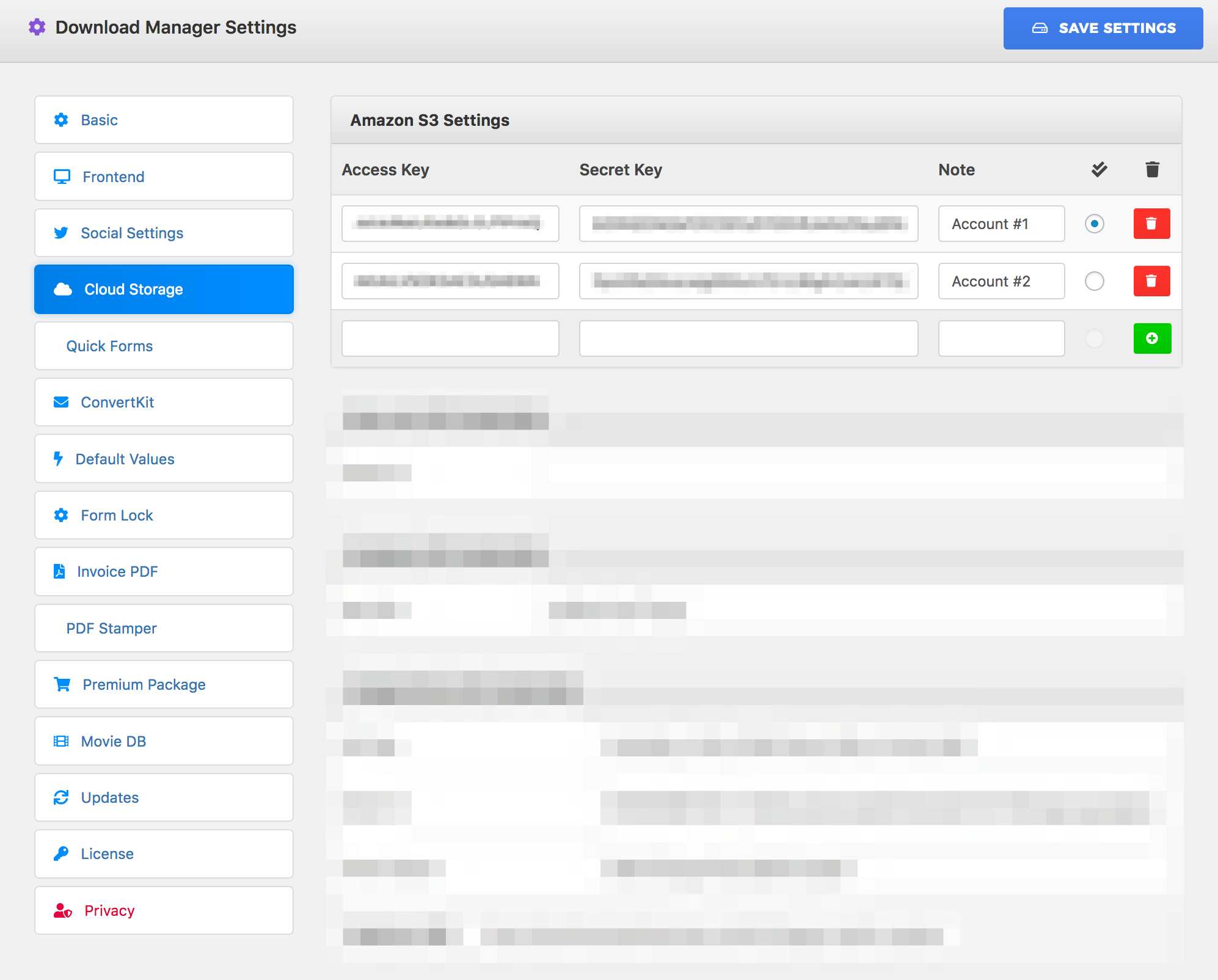
Enter Access key and secret key, then Save Settings -
Full-Featured WordPress Amazon S3 File Manager ( beta )
-
Explore & Attach Files:
In add/edit package window, you will see a new meta box like the following image:
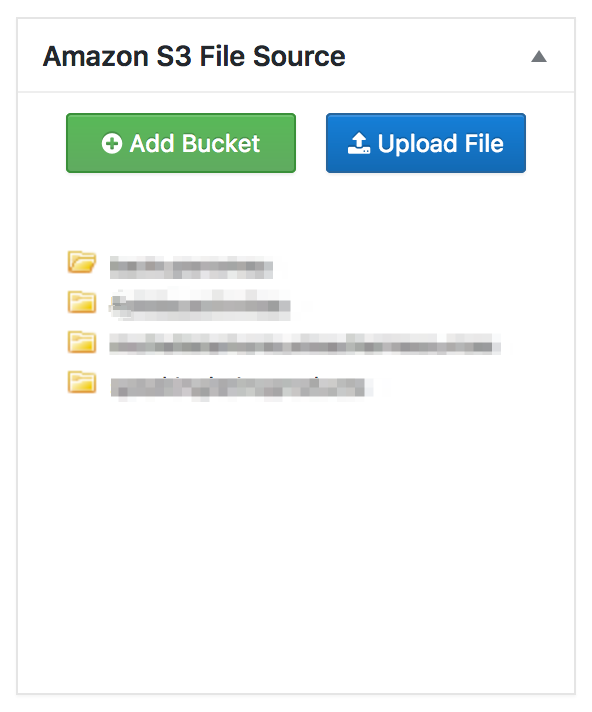
From here you need to click on dir name in dir tree to see the file list and click on the file name to attach a file with the package, use the “Create Bucket” button for creating a new bucket and the “Upload File” button to upload a file directly to amazon s3.
How to generate Amazon IAM Access Key and Secret Key?
Force Download Amazon S3 Files:
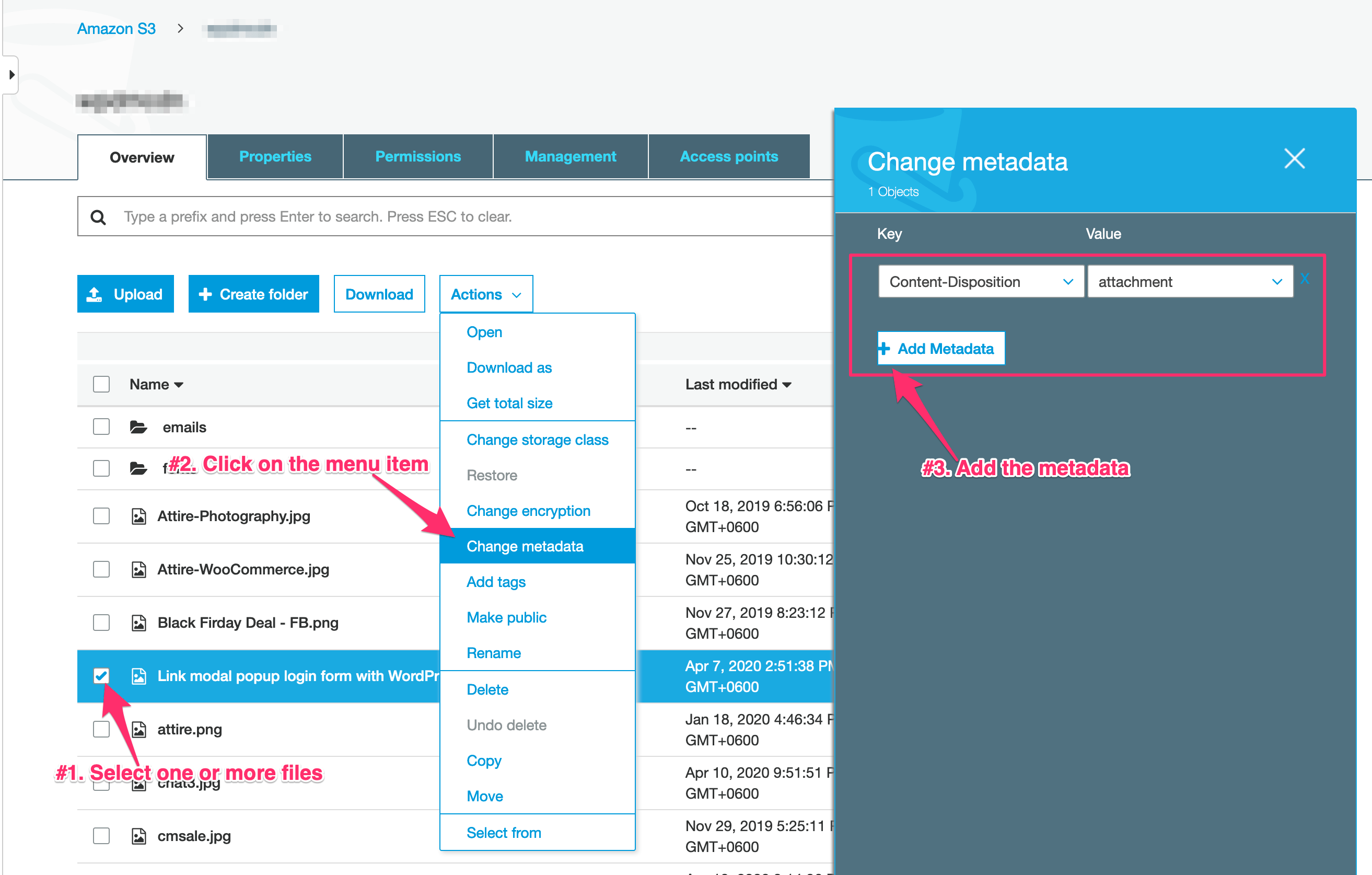
Sometimes it may happen for image, video, or audio files when you hit the download button, it opens in the browser instead of downloading. You can change the behavior and force download amazon s3 files. You need the follow the steps marked on the image below:
Available With Discounted Packs
This add-on is available with the Special Pack and the eCommerce Pack. If you already have any of those packs or the all addons pack, you can download it for FREE
This add-on is available with the Special Pack and the eCommerce Pack. If you already have any of those packs or the all addons pack, you can download it for FREE
Changelog:
Version 3.2.0 | Released on Sep 16, 2023
- Update! Updated Amazon AWS SDK
- Fix! Fixed an issue with the file delete function
Version 3.1.4 | Released on Jul 08, 2023
- Fix! Fixed an issue with the bucket explorer function
Version 3.1.3 | Released on May 12, 2023
- Update! Updated AWS SDK for PHP 8 compatibility
Version 3.1.2 | Released on Mar 13, 2023
- Update! Compatibility update for WordPress Download Manager Pro 6.3.0
Version 3.1.0 | Released on Mar 01, 2022
- New! Added auto-update routine
- Update! Updated AWS sdk
Version 3.0.3 | Released on Jul 04, 2021
- Update! Compatibility update for wpdm v6 and v3.2
Version 3.0.2 | Released on Feb 04, 2021
- Update! Added check all option for readonly bucket
Version 3.0.1 | Released on Dec 09, 2020
- Fix! Fixed an issue with the multiple file delete
- Fix! Fixed an issue with the large file upload to s3
Version 3.0.0 | Released on Dec 02, 2020
- New! Added auto-upload option
- New! Added new options for role-bases access control
Version 2.9.0 | Released on Oct 23, 2020
- Upgrade! Improved list object query to make it faster
Version 2.8.1 | Released on Apr 13, 2020
- Fix! Fixed tailing slash issue with folder name
Version 2.8.0 | Released on Apr 13, 2020
- Upgrade! Improved s3 explorer
Version 2.7.8 | Released on Feb 24, 2020
- Fix! Fixed the issue with file upload inside a directory
Version 2.7.7 | Released on Jan 22, 2020
- New! Compatibility update for WordPress Download Manager Proo 5.0.5
Version 2.7.6 | Released on July 09, 2019
- Fix! Fixed an issue with file upload
Version 2.7.5 | Released on Jun 21, 2019
- New! Added multi-region bucket support
Version 2.7.4 | Released on Jun 20, 2019
- Fix! Fixed an issue with multi-account support
Version 2.7.3 | Released on Oct 11, 2018
- New! Added multi-account support
- Fix! Fixed an issue with file name
Version 2.7.2 | Released on Jul 09, 2018
- Fix! Fixed an issue with download stats
Version 2.6.4 | Released on Mar 21, 2018
- Update! Compatibility release for WordPress Download Manager Pro 4.7.4
Version 2.6.4 | Released on Jan 17, 2018
- Fix! Fixed the issue aws file explorer
Version 2.6.1 | Released on Jun 29, 2017
- Fix! Fixed the issue with file upload to S3
Version 2.6.0 | Released on May 08, 2017
- Update! Compatibility update of WordPress Download Manager Pro v4.6.6
Version 2.5.2 | Released on July 16, 2016
- Fix! Fixed issue with special chars in dir name
Version 2.5.1 | Released on July 13, 2016
- Fix! Fixed issue with object explorer in tree view
Version 2.5.0 | Released on July 08, 2016
- New! Added S3 File Manager


Reviews
Clear filtersThere are no reviews yet.