 🔑 Software keys sent via WhatsApp or E-mail within 24 hours (1 Day) ! ⏳ If not received, Contact us! ! 📬



 Recently Updated

WPDM Directory Add-on

WordPress Download Manager Directory Add-on will help WordPress Download Manager users to show all categories and downloads on a single page with different styles.
WordPress Download Manager Directory Add-on Setup Instructions:
Install:
Upload/Install from Admin Menu Plugins Add New Upload, Just the same way as other WordPress plugins.
Usage:
[wpdm_archive button_style=“default” template=“link-template-default” cols=1 items_per_page=“10” orderby=“title” order=“ASC” login=1 last_state=0]
[wpdm_archive_compact template=“link-template-default” cols=2 colspad=1 colsphone=1 items_per_page=“10” orderby=“title” order=“ASC” login=1]
[wpdm_archive_simple template=“link-template-default” cols=2 colspad=1 colsphone=1 items_per_page=“10” orderby=“title” order=“ASC” login=1]
[wpdm_archive_flat orderby=“title” order=“ASC”]
Use the shortcode inside page or post content to show directory like interface for WordPress Download Manager
Parameters:
— buton_style: `default` or `success` or `info` or `warning` or `danger` or `primary` or `secondary`
— template: any link-template ID( optional parameter )
— category: use any category slug here if you want to create an archive page for that specific category or don’t use the parameter
— include_children: if you use category parameter, on initial load, it only will fetch the packages from the mentioned categories, if you want to include packages from sub-categories too, you must use include_children=1.
— orderby: `package_size_b` or `date` or `modified` or `download_count` or `view_count` or `title`
— order: `asc` or `desc`
— order_fields: optional parameter, you can use this option if you want to edit order fields dropdown options. Ex:
order_fields=“date:Date|title:Title|modified:Last Updated”
— login: 1, use this parameter if you want to make the shortcode members only / login protected. Otherwise, you may skip this parameter.
[wpdm_categories] – Use the shortcode inside page or post content to show all categories
[wpdm_categories subcat=“1” showcount=“0” cols=3]
Parameters:
— subcat: Show ( 1 ) or Hide ( 0 ) sub-categories
— showcount: Show ( 1 ) or Hide ( 0 ) number of packages in a category
— cols: Number of columns
[wpdm_tags btnstyle=“link” icon=“tag” showcount=1 cols=3]
Parameters:
— showcount: Show ( 1 ) or Hide ( 0 ) number of packages in a category
— cols: Number of columns
— icon: Font awesome icon
— btnstyle: Button style, possible values: link | secondary | primary | success | info | warning | danger
[wpdm_category_blocks categories=“slug1,slug2…” cols=4 button_color=“green|blue|purple|primary|info|warning|danger|success|#colorcode” hover_color=“primary-hover|info-hover|warning-hover|danger-hover|success-hover|#colorcode”]
Parameters:
— categories: Category slugs separated by comma
— cols: Number of columns, 1 or 2 or 3 or 4 or 6 or 12
— button_color: Block color scheme, use any of the pre-defined colors ( green, blue, purple, primary, info, warning, danger, success or color code like #339966
— hover_color: Block hove color, use any of the pre-defined colors ( green, blue, purple, primary-hover, info-hover, warning, danger-hover, success-hover or color code like #339966
Generates advanced search and filter page:
[wpdm_archive_filter items_per_page=“12” template=“link-template-default” cols=1 colspad=1 colsphone=1]
Parameters:
— template: any link-template ID ( optional parameter )
— category: use any category slug here if you want to create an archive page for that specific category or don’t use the parameter
— include_children: if you use category parameter, on initial load, it only will fetch the packages from the mentioned categories, if you want to include packages from sub-categories too, you must use include_children=1.
— orderby: `package_size_b` or `date` or `modified` or `download_count` or `view_count` or `title`
— order_fields: optional parameter, you can use this option if you want to edit order fields dropdown options. Ex:
order_fields=“date:Date|title:Title|modified:Last Updated”
— order: `asc` or `desc`
— login: 1, use this parameter if you want to make the shortcode members only / login protected. Otherwise, you may skip this parameter.
— cols: Number of columns, 1 or 2 or 3 or 4 or 6 or 12 ( optional parameter )
— colspad: Number of columns in tabs/pads, 1 or 2 or 3 or 4 or 6 or 12 ( optional parameter )
— colsphone: Number of columns in phone, 1 or 2 or 3 or 4 or 6 or 12 ( optional parameter )
— sidebar: left or right
additionally, there is a search box widget for searching downloads.
Note:
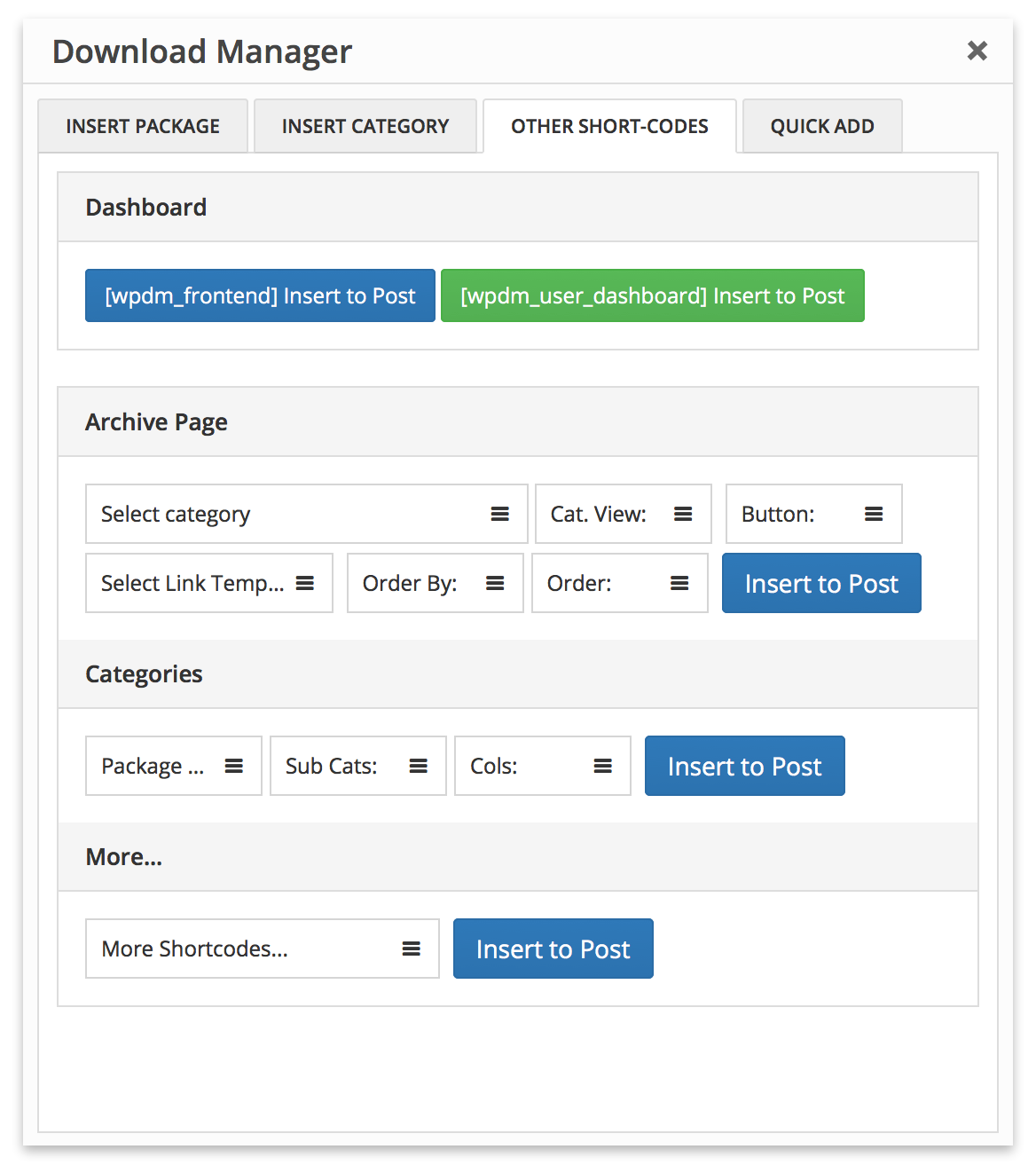
Please use WPDM Gutenberg Block Add-on or Advanced TinyMCE Button Add-on to generate short-codes properly, short-code options are marked in the following image:
Editing Template Files:
If you want to customize a view in your own way, you need to edit template files inside /plugins/wpdm-arhive-page/src/Templates/****/views/ dir. Please follow the following steps to edit a template file so that the new update doesn’t erase your changes:
- Create a dir path
download-manager/wpdm-arhive-page/****inside your active theme directory if it is already not there. Here replace****withsimpleorflatorfilterorcompact, depending on the template dir name, from where you are moving the template file. - For example, if you are editing template file from
/wpdm-archive-page/src/Templates/Filter/views, you need to place it in{active-theme-dir}/download-manager/wpdm-arhive-page/filter/ - Copy all the files you need to modify
- Update template file(s) in
{active-theme-dir}/download-manager/wpdm-arhive-page/****dir as per your need
WPDM Directory Add-on Demo:
WPDM Directory Add-on demo links:
Archive Page DefaultArchive Page FlatArchive Page CompactArchive Page SimpleArchive Page GreenCategoriesAdvanced SearchAdvanced Search ( Left )Advanced Search ( Right )Simple Search
Changelog:
Version 4.4.6 | Released on Jan 21, 2022
- Fix! Fixed an issue with initial download display
Version 4.4.5 | Released on Oct 09, 2022
- Update! Updated translation file for a couple of missing strings
Version 4.4.4 | Released on May 10, 2022
- Fix! Fixed an issue with the sorting fields dropdown options
Version 4.4.3 | Released on Fev 28, 2022
- Fix! Fixed auto initialization issue with the simple search shortcode
Version 4.4.2 | Released on Fev 09, 2022
- Fix! Fixed auto filter issue with the starter layout
Version 4.4.1 | Released on Jan 14, 2022
- Fix! Fixed icon issue with the archive page flat shortcode
Version 4.4.0 | Released on Jan 12, 2022
- Fix! Fixed an issue with the archive page flat shortcode
- New! Improved front-end UI
Version 4.3.3 | Released on Nov 15, 2021
- Fix! Fixed an issue with the tinymce button helper ( shortcode generator )
Version 4.3.2 | Released on Sep 05, 2021
- Fix! Fixed an issue with the translation file ( .pot )
Version 4.3.1 | Released on Sep 01, 2021
- Fix! Fixed an issue with the package order/sorting
Version 4.3.0 | Released on Aug 25, 2021
- Update! Competibility update for WordPress Download Manager Pro 6.0.7
Version 4.2.1 | Released on Aug 05, 2021
- Fix! Fixed an issue with the archive page flat shortcode
Version 4.2.0 | Released on Aug 04, 2021
- Update! Compatibility update for wpdm v6.0.6 and v3.2.13
Version 4.1.6 | Released on Jul 17, 2021
- New! Optimized default view, added new parameter
last_state=0/1to control last state and auto-expand category tree
Version 4.1.5 | Released on Jul 14, 2021
- Fix! Fixed an issue with multiple category selection in archive page filter
Version 4.1.4 | Released on Jul 07, 2021
- Update! Compatibility update for wpdm v6 and v3.2
Version 4.1.3 | Released on Feb 07, 2021
- Fix! Fixed an issue with an order by filter with archive page views
Version 4.1.2 | Released on Jan 24, 2021
- Update! Compatibility update for wpdm v3
Version 4.1.1 | Released on Jan 09, 2021
- Fix! Fixed an issue with the advanced search page view ( with sidebar filter )
Version 4.1.0 | Released on Nov 27, 2020
- Update! Restored the shortcode [wpdm_archive_flat]
Version 4.0.3 | Released on Nov 14, 2020
- Fix! Fixed an issue with tag filter on advanced search/filter shortcode
Version 4.0.2 | Released on Nov 14, 2020
- Update! Reinstated [wpdm_tags] shortcode.
Version 4.0.0 | Released on Oct 20, 2020
- New! Recoded from ground for better performance and styles
- New! Added new advanced search and filter page view
Version 3.1.1 | Released on Jul 27, 2020
- Fix! Fixed the issue with categroy filter
Version 3.1.0 | Released on Jul 25, 2020
- Update! Compatibility update for WPDM Pro 5.2
Version 3.0.3 | Released on May 20, 2020
- Fix! Fixed an issue with the category blocks
Version 3.0.2 | Released on Dec 22, 2019
- Update! Compatibity update for the latest version of wpdm
Version 3.0.1 | Released on Aug 29, 2019
- Upgrade! Improved directory pages UI
Version 3.0.0 | Released on June 12, 2019
- Fix! Fixed and issue with category listing
Version 2.9.9 | Released on Apr 18, 2019
- Fix! Fixed issue with user input sanitization
Version 2.9.8 | Released on Feb 10, 2019
- Fix! Fixed link template query issue ( warning )
Version 2.9.7 | Released on Jan 23, 2019
- Fix! Fixed package sorting issue with archive page sidebar view
Version 2.9.6 | Released on Dec 22, 2018
- Update! Improved default views
- Update! Compatibility update for the latest version of wpdm
Version 2.9.5 | Released on Oct 30, 2018
- Update! Updated sidebar view
- Update! Compatibility update for the latest version of wpdm
Version 2.9.3 | Released on Jun 25, 2018
- New! Added new option to show/hide package count with category
- Fix! Fixed the issue with pagination
Version 2.9.2 | Released on May 21, 2018
- New! Added category hirarchy in compact view category dropdown
Version 2.9.1 | Released on Mar 02, 2018
- New! Added new shortcode parameter
login=1, in case, you want to make the page login protected.
Version 2.9.0 | Released on Sep 16, 2017
- Fix! Fixed multiple shortcode usage issue with archive page sidebar view
Version 2.8.8 | Released on Apr 22, 2017
- Fix! Fixed category dropdown issue in compact view
Version 2.8.7 | Released on Apr 6, 2017
- Fix! Fixed package not found an issue when search keyword combined with an order by a parameter ( download count, size, view )
Version 2.8.6 | Released on Feb 21, 2017
- Fix! Fixed items per page issue with sidebar layout
Version 2.8.5 | Released on Oct 31, 2016
- Fix! Fixed search issue that occurred when using custom database prefix
Version 2.8.4 | Released on Oct 27, 2016
- Fix! Fixed search issue in multi-site
- Fix! Fixed few minor issues in advanced search
Version 2.8.2 | Released on Mar 03, 2015
- Fix! Fixed icon path issue with sidebar view
Version 2.8.1 | Released on Jan 11, 2016
- New! Added sidebar view for advanced search page
- New! Improved search option to search by keyword within a category
- New! Improved search option to search by keyword within a file list
Version 2.7.0 | Released on Oct 21, 2015
- New! Added new cats views
Version 2.6.2 | Released on Aug 20, 2015
- Fix! Compatibility release for WordPress 4.3


Reviews
Clear filtersThere are no reviews yet.